
We provide SoftKey - Home Back Button online (apkid: vimal.launcher.com.plah) in order to run this application in our online Android emulator.
Description:
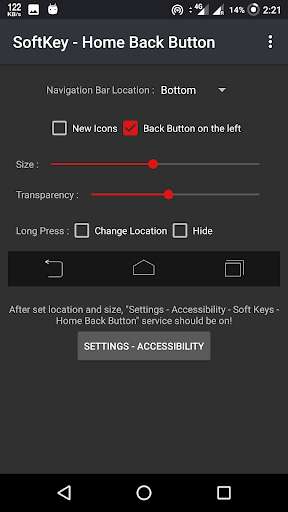
Run this app named SoftKey - Home Back Button using MyAndroid.
You can do it using our Android online emulator.
Softkey of the back button.
I work does not require root.
More SecureAuto hide navigation bar.
More EfficientAbility to change navigation bar with background and button color
Key Features:
Auto-hide navigation bar
Easy to wipe up/down to show/hide navigation bar
Functions: Home, Back, Recent
Ability to Set vibrate on touch
Options to lock navigation bar
Ability to change navigation bar with background and button color
Ability to set navigation bar size with height
2 Themes Available
Long press action for back, home, recent buttons
How to use ?
Open app, enable permissions if asked
Set location, size .
Click "Settings-Accessibility" button
Find "SoftKey - Back Home Button" and enable it.
Contact Us:
Facebook: https: //www.facebook.com/vimalcvs
Please send us your feedback via [email protected]
For business/designer cooperation, please do not hesitate to contact
Email: [email protected]
Website: https: //www.technovimal.in
Privacy Policy & Terms of Service:
https: //ducslecture.blogspot.com/2019/07/PrivacyPolicy.html
I work does not require root.
More SecureAuto hide navigation bar.
More EfficientAbility to change navigation bar with background and button color
Key Features:
Auto-hide navigation bar
Easy to wipe up/down to show/hide navigation bar
Functions: Home, Back, Recent
Ability to Set vibrate on touch
Options to lock navigation bar
Ability to change navigation bar with background and button color
Ability to set navigation bar size with height
2 Themes Available
Long press action for back, home, recent buttons
How to use ?
Open app, enable permissions if asked
Set location, size .
Click "Settings-Accessibility" button
Find "SoftKey - Back Home Button" and enable it.
Contact Us:
Facebook: https: //www.facebook.com/vimalcvs
Please send us your feedback via [email protected]
For business/designer cooperation, please do not hesitate to contact
Email: [email protected]
Website: https: //www.technovimal.in
Privacy Policy & Terms of Service:
https: //ducslecture.blogspot.com/2019/07/PrivacyPolicy.html
MyAndroid is not a downloader online for SoftKey - Home Back Button. It only allows to test online SoftKey - Home Back Button with apkid vimal.launcher.com.plah. MyAndroid provides the official Google Play Store to run SoftKey - Home Back Button online.
