

We provide Roadsoft online (apkid: tdg.roadsoftandroid.sign) in order to run this application in our online Android emulator.
Description:
Run this app named Roadsoft using MyAndroid.
You can do it using our Android online emulator.
Roadsoft Mobile for road, sign, culvert, drainage structure, and sidewalk management activities, combined with Roadsoft desktop software, provides Roadsoft users a powerful set of tools to enable management on the go.
With Roadsoft Mobile, users can create, complete, and submit changes on work orders, maintenance, and other related records right from a sign, culvert, drainage structure or sidewalk location.
Roadsoft Mobile for road collection allows the user to enter PASER ratings along with Inventory Base Ratings (IBR) for unpaved roads, while allowing for inventory updates along the way.
Key Features
Access uploaded road, sign, culvert, drainage structures and sidewalk data from cloud storage.
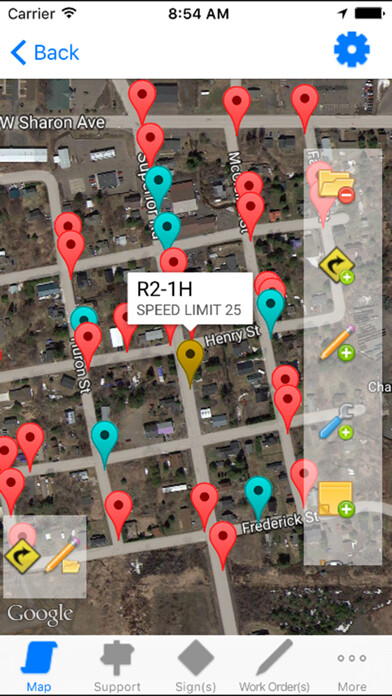
View and edit road, sign, culvert, drainage structures and sidewalk data on an interactive Google map.
Add location and edit inventory for signs, culverts, drainage structures and sidewalks.
Enter PASER and IBR ratings for road segments.
Complete existing sign, culvert, drainage structure, and sidewalk work orders.
Complete sign, drainage structure and sidewalk inspections and culvert ratings.
Complete Culvert Stream Crossing Surveys.
Submit completed work to cloud storage.
App Requirements
Internet connection
Roadsoft Cloud Key (available from the Center for Technology & Training)
Roadsoft desktop software (2020.10 or higher)
Android 4.0.3 (or higher)
Note: Use of Roadsoft Mobile requires a licensed copy of Roadsoft software (desktop).
For more information about obtaining a licensed copy of Roadsoft desktop, please go to our website http: //roadsoft.us.
With Roadsoft Mobile, users can create, complete, and submit changes on work orders, maintenance, and other related records right from a sign, culvert, drainage structure or sidewalk location.
Roadsoft Mobile for road collection allows the user to enter PASER ratings along with Inventory Base Ratings (IBR) for unpaved roads, while allowing for inventory updates along the way.
Key Features
Access uploaded road, sign, culvert, drainage structures and sidewalk data from cloud storage.
View and edit road, sign, culvert, drainage structures and sidewalk data on an interactive Google map.
Add location and edit inventory for signs, culverts, drainage structures and sidewalks.
Enter PASER and IBR ratings for road segments.
Complete existing sign, culvert, drainage structure, and sidewalk work orders.
Complete sign, drainage structure and sidewalk inspections and culvert ratings.
Complete Culvert Stream Crossing Surveys.
Submit completed work to cloud storage.
App Requirements
Internet connection
Roadsoft Cloud Key (available from the Center for Technology & Training)
Roadsoft desktop software (2020.10 or higher)
Android 4.0.3 (or higher)
Note: Use of Roadsoft Mobile requires a licensed copy of Roadsoft software (desktop).
For more information about obtaining a licensed copy of Roadsoft desktop, please go to our website http: //roadsoft.us.
MyAndroid is not a downloader online for Roadsoft. It only allows to test online Roadsoft with apkid tdg.roadsoftandroid.sign. MyAndroid provides the official Google Play Store to run Roadsoft online.
