
We provide SchreckerFree: Alarm, Stopwatch, Timer and Puzzle online (apkid: schoening.apps.alarm.schrecker.free) in order to run this application in our online Android emulator.
Description:
Run this app named SchreckerFree: Alarm, Stopwatch, Timer and Puzzle using MyAndroid.
You can do it using our Android online emulator.
SchreckerFree - The slightly different alarm clock
If your alarm lets you down, let the SCHRECKER wake the town.
You know the problem: getting up too late because you slept through the alarm clock.
Because you stopped it somehow unconsciously in a doze.
And now you are too late for school, work or another important appointment and you start the day feeling stressed.
SCHRECKER takes care of that problem! It is there when the normal alarm fails to wake you up.
You can only stop it by solving a challenge.
(Of course only if you activate this option.)
Choose between maths (more in the Pro-Version: numerical series, sound, sorting, or geometry) challenges.
You determine the level of difficulty for the task, the snooze time and whether one of SCHRECKERS own sounds, or the music from the mobile library wakes you up.
One thing is for sure though: You cant cheat the SCHRECKER.
And this is SCHRECKER:
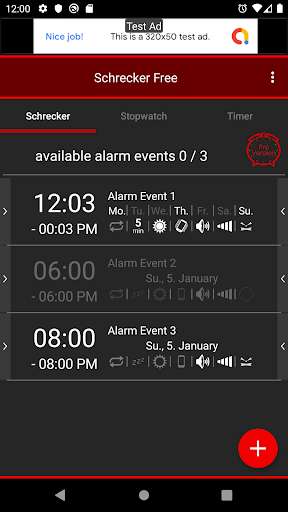
Create individual alarm profiles, save them and use them whenever you set new alarm times.
Once you created a profile, you only have to activate it for a new alarm.
This way, you dont have to start from scratch with the individual settings.
Assign different challenges (Free-Version: maths; more in the Pro-Version: numerical series, sound, sorting, geometry, or QR-/Barcode scan)) to your SCHRECKER and determine the level of difficulty yourself.
This way, even a half-awake wizard at figures is challenged.
Only if you solved the challenge will the SCHRECKER keep quiet.
No cheating possible.
Not even by closing the app.
Additionally, you can create a QR code or barcode that must be scanned to deactivate SCHRECKER.
Place the code in another room and you are forced to get out of bed.
You can set a vibration, light, or - obviously - a sound alarm.
You determine the kind of sound and the volume level.
Choose between the SCHRECKER-like sounds of the app or use your favorite music (only Pro-Version) as wake-up signal.
If you select several sounds, SCHRECKER randomly decides which of the sounds will be used.
This way, you can avoid getting used to a certain sound.
Of course you can also use SCHRECKER as a stopwatch or timer.
SCHRECKER allows you to use practical extra features:
Statistics give you a quick overview of the average time the alarm rings until you SCHRECK-up and how many challenges you solved and didnt solve.
Furthermore, you can keep track when you deactivated the last alarm functions.
In addition, you can have your favorite app opened after the deactivation of SCHRECKER - global news, your own playlist, or recent news of your friends - all without having to search through the entire app list.
If your alarm lets you down, let the SCHRECKER wake the town.
You know the problem: getting up too late because you slept through the alarm clock.
Because you stopped it somehow unconsciously in a doze.
And now you are too late for school, work or another important appointment and you start the day feeling stressed.
SCHRECKER takes care of that problem! It is there when the normal alarm fails to wake you up.
You can only stop it by solving a challenge.
(Of course only if you activate this option.)
Choose between maths (more in the Pro-Version: numerical series, sound, sorting, or geometry) challenges.
You determine the level of difficulty for the task, the snooze time and whether one of SCHRECKERS own sounds, or the music from the mobile library wakes you up.
One thing is for sure though: You cant cheat the SCHRECKER.
And this is SCHRECKER:
Create individual alarm profiles, save them and use them whenever you set new alarm times.
Once you created a profile, you only have to activate it for a new alarm.
This way, you dont have to start from scratch with the individual settings.
Assign different challenges (Free-Version: maths; more in the Pro-Version: numerical series, sound, sorting, geometry, or QR-/Barcode scan)) to your SCHRECKER and determine the level of difficulty yourself.
This way, even a half-awake wizard at figures is challenged.
Only if you solved the challenge will the SCHRECKER keep quiet.
No cheating possible.
Not even by closing the app.
Additionally, you can create a QR code or barcode that must be scanned to deactivate SCHRECKER.
Place the code in another room and you are forced to get out of bed.
You can set a vibration, light, or - obviously - a sound alarm.
You determine the kind of sound and the volume level.
Choose between the SCHRECKER-like sounds of the app or use your favorite music (only Pro-Version) as wake-up signal.
If you select several sounds, SCHRECKER randomly decides which of the sounds will be used.
This way, you can avoid getting used to a certain sound.
Of course you can also use SCHRECKER as a stopwatch or timer.
SCHRECKER allows you to use practical extra features:
Statistics give you a quick overview of the average time the alarm rings until you SCHRECK-up and how many challenges you solved and didnt solve.
Furthermore, you can keep track when you deactivated the last alarm functions.
In addition, you can have your favorite app opened after the deactivation of SCHRECKER - global news, your own playlist, or recent news of your friends - all without having to search through the entire app list.
MyAndroid is not a downloader online for SchreckerFree: Alarm, Stopwatch, Timer and Puzzle. It only allows to test online SchreckerFree: Alarm, Stopwatch, Timer and Puzzle with apkid schoening.apps.alarm.schrecker.free. MyAndroid provides the official Google Play Store to run SchreckerFree: Alarm, Stopwatch, Timer and Puzzle online.
