

We provide Shortcut Maker online (apkid: rk.android.shortcutmaker) in order to run this application in our online Android emulator.
Description:
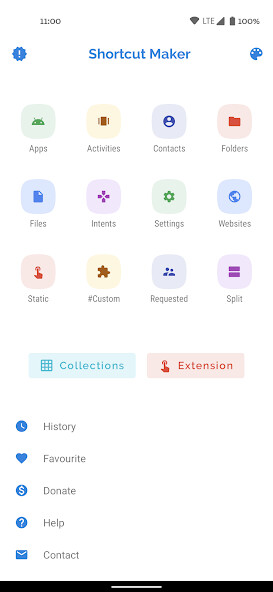
Run this app named Shortcut Maker using MyAndroid.
You can do it using our Android online emulator.
This app can create a shortcut on android homescreen for anything you want from your android.
Simply select the feature and click on CREATE to shortcut.
That's it!
Quite simple right?
You can also use this app to launch an actvity from installed app.
Apps and Activities: Create shortcut of installed apps and activities.
Folder and Files : Create shortcut of folder and files from internal storage.
Intents: Create shortcut of android system intents along with the default app.
Quick Settings: Create shortcut to quickly change your system settings.
Website: Shortcut for your favourite website.
User Requested: Features that are requested by users.
#Custom#: Just a bonus and fresh feature to get shortcuts from installed apps and edit in this app before creating.
Contact me: Shortcut to mail me your suggestions : )
Shortcut Preview: after selecting the activity app will show you a preview of shortcut before creating.
Here you can also rename the shortcut name.
You can also add shortcut to favourite.
History: here you can check the list of shortcuts created by you.
Favourite: here you can check the list of your favourite shortcuts.
If you wish to add any features in this app, please send me your responses and feedbacks on [email protected] (Don't forget to add app name in subject)
Special Thanks to MaterialSearchView (Thanks MiguelCatalan! : )) for providing a free searchview with a clean UI with simple implementation.
Here's the link the library I used for this:
https: //github.com/MiguelCatalan/MaterialSearchView
Simply select the feature and click on CREATE to shortcut.
That's it!
Quite simple right?
You can also use this app to launch an actvity from installed app.
Apps and Activities: Create shortcut of installed apps and activities.
Folder and Files : Create shortcut of folder and files from internal storage.
Intents: Create shortcut of android system intents along with the default app.
Quick Settings: Create shortcut to quickly change your system settings.
Website: Shortcut for your favourite website.
User Requested: Features that are requested by users.
#Custom#: Just a bonus and fresh feature to get shortcuts from installed apps and edit in this app before creating.
Contact me: Shortcut to mail me your suggestions : )
Shortcut Preview: after selecting the activity app will show you a preview of shortcut before creating.
Here you can also rename the shortcut name.
You can also add shortcut to favourite.
History: here you can check the list of shortcuts created by you.
Favourite: here you can check the list of your favourite shortcuts.
If you wish to add any features in this app, please send me your responses and feedbacks on [email protected] (Don't forget to add app name in subject)
Special Thanks to MaterialSearchView (Thanks MiguelCatalan! : )) for providing a free searchview with a clean UI with simple implementation.
Here's the link the library I used for this:
https: //github.com/MiguelCatalan/MaterialSearchView
MyAndroid is not a downloader online for Shortcut Maker. It only allows to test online Shortcut Maker with apkid rk.android.shortcutmaker. MyAndroid provides the official Google Play Store to run Shortcut Maker online.
