

We provide Uninstall & Run Widget online (apkid: pl.coddev.applu.light) in order to run this application in our online Android emulator.
Description:
Run this app named Uninstall & Run Widget using MyAndroid.
You can do it using our Android online emulator.
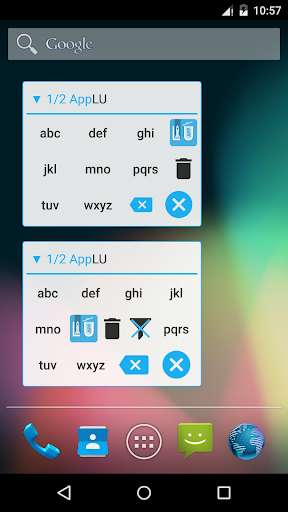
This is a unique widget app letting you uninstall, launch & find your apps directly from your home screen!
Features:
finding, launching and uninstalling an app directly from the widget
just find first letters from app name on the widget keyboard and run or uninstall it.
It's really quick.
handy list of last ran apps, always accesible from your home screen (no need to pull anything)
you can use multiple widgets
6 widgets with different, suited layouts
What makes this app different from similar apps?
Finding, launching and uninstalling any app directly from the widget.
There are a few other "uninstall widgets" but you need to setup before usage which app you want to run or uninstall, which makes it not very usable.
Just add one of the widget layouts and enjoy this fast & lightweight app manager.
Ever imagined how great it would be to find & manage your apps without the hassle of entering other screens/apps?
Then this is an app for you.
Do you install & remove a lot of apps? Now, you can uninstall them painlessly.
Are you an app developer, often installing and re-installing same apps? Just type in the name and enjoy ultra-fast launch & uninstall straight from the home screen.
NOTE:
AppLU cannot uninstall preinstalled apps in the system because it is limited by the Android security system.
DISCLAIMER:
This app can be used by user to delete applications with data.
Always make sure that you don't need this data anymore, or make a backup before uninstalling.
Creator of AppLU is not responsible in any way for any data loss that occurred as a result of using this app.
Rocket icon made by Freepik (http: //www.freepik.com) from Flaticon (ttp: //www.flaticon.com) is licensed under Creative Commons BY 3.0 (http: //creativecommons.org/licenses/by/3.0/")
Features:
finding, launching and uninstalling an app directly from the widget
just find first letters from app name on the widget keyboard and run or uninstall it.
It's really quick.
handy list of last ran apps, always accesible from your home screen (no need to pull anything)
you can use multiple widgets
6 widgets with different, suited layouts
What makes this app different from similar apps?
Finding, launching and uninstalling any app directly from the widget.
There are a few other "uninstall widgets" but you need to setup before usage which app you want to run or uninstall, which makes it not very usable.
Just add one of the widget layouts and enjoy this fast & lightweight app manager.
Ever imagined how great it would be to find & manage your apps without the hassle of entering other screens/apps?
Then this is an app for you.
Do you install & remove a lot of apps? Now, you can uninstall them painlessly.
Are you an app developer, often installing and re-installing same apps? Just type in the name and enjoy ultra-fast launch & uninstall straight from the home screen.
NOTE:
AppLU cannot uninstall preinstalled apps in the system because it is limited by the Android security system.
DISCLAIMER:
This app can be used by user to delete applications with data.
Always make sure that you don't need this data anymore, or make a backup before uninstalling.
Creator of AppLU is not responsible in any way for any data loss that occurred as a result of using this app.
Rocket icon made by Freepik (http: //www.freepik.com) from Flaticon (ttp: //www.flaticon.com) is licensed under Creative Commons BY 3.0 (http: //creativecommons.org/licenses/by/3.0/")
MyAndroid is not a downloader online for Uninstall & Run Widget. It only allows to test online Uninstall & Run Widget with apkid pl.coddev.applu.light. MyAndroid provides the official Google Play Store to run Uninstall & Run Widget online.
