
We provide AudioUtil Audio Analysis Tools online (apkid: org.sbaudio.audiotoolsfree) in order to run this application in our online Android emulator.
Description:
Run this app named AudioUtil Audio Analysis Tools using MyAndroid.
You can do it using our Android online emulator.
AudioUtil features tools for capturing and analyzing audio signals from your devices microphone in real-time.
Screenshots of the display can easily be taken through the utility'scontext menu.
Touch the graph to show a value readout.
Adjust multiple parameters like sample rate, buffer size, zero padding, window type, range, and themes to name a few.
Utility Descriptions:
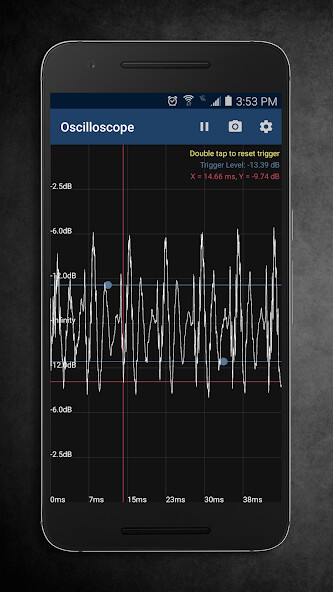
Oscilloscope
View sound waves in the time domain.
Amplitude measurement by dragging on the screen.
(Pro)Set trigger level to freeze display if audio exceeds amplitude threshold.
Displays time and amplitude in readout.
Meter
Amplitude readout with variable time falloff.
FFT
(Pro)Linear and logged frequency axis.
(Pro)Peak tracking for up to five peaks.
Displays frequency and amplitude in readout.
Spectrogram
Definable frequency limits to zoom in on desired frequencies.
(Pro)Four themes/color maps.
Displays time, frequency, and amplitude in readout.
Spectrum
View a FFT analysis as a color spectrum.
(Pro)Four themes/color maps.
Displays frequency and amplitude in readout.
About permissions: This app requests minimal permissions to record audio and to write to storage.
These are required in order to successfully capture sound and save screenshots to the device.
Screenshots of the display can easily be taken through the utility'scontext menu.
Touch the graph to show a value readout.
Adjust multiple parameters like sample rate, buffer size, zero padding, window type, range, and themes to name a few.
Utility Descriptions:
Oscilloscope
View sound waves in the time domain.
Amplitude measurement by dragging on the screen.
(Pro)Set trigger level to freeze display if audio exceeds amplitude threshold.
Displays time and amplitude in readout.
Meter
Amplitude readout with variable time falloff.
FFT
(Pro)Linear and logged frequency axis.
(Pro)Peak tracking for up to five peaks.
Displays frequency and amplitude in readout.
Spectrogram
Definable frequency limits to zoom in on desired frequencies.
(Pro)Four themes/color maps.
Displays time, frequency, and amplitude in readout.
Spectrum
View a FFT analysis as a color spectrum.
(Pro)Four themes/color maps.
Displays frequency and amplitude in readout.
About permissions: This app requests minimal permissions to record audio and to write to storage.
These are required in order to successfully capture sound and save screenshots to the device.
MyAndroid is not a downloader online for AudioUtil Audio Analysis Tools. It only allows to test online AudioUtil Audio Analysis Tools with apkid org.sbaudio.audiotoolsfree. MyAndroid provides the official Google Play Store to run AudioUtil Audio Analysis Tools online.
