
We provide Find Location By Phone Number online (apkid: om.roitman.autowhatsapptriggers) in order to run this application in our online Android emulator.
Description:
Run this app named Find Location By Phone Number using MyAndroid.
You can do it using our Android online emulator.
Waloc - Reply automatically with your recent GPS location through WhatsApp on a specific WhatsApp message
NOTE: THE APP NEEDS TO BE INSTALLED ON THE TARGET DEVICE THAT NEEDS TO BE LOCATED
Waloc can be used for lots of reasons:
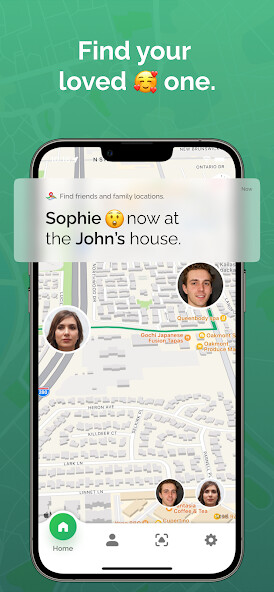
Family locator - each family member can install the app, define a specific message that Waloc will reply automatically with the current location to that message through WhatsApp
Phone locator - find your own device if it gets lost from any device (laptops, iphones, etc) that is using WhatsApp
Car locator - if your car has a built-in android system you can install the app there, define a specific message and Waloc will reply with the recent location through WhatsApp whenever that message being sent
Waloc returns the location of the device for a specific WhatsApp message that you define and sends a location URL through WhatsApp that shows the device location on Google Maps
Returns location automatically on a specific WhatsApp message
Returns device battery level and/or network signal quality with the location (configurable)
Battery friendly app - does not consume any battery power
It's so simple that you will be amazed.
So why wait?
Locate what you need with Waloc - GPS Locator for Whatsapp
Watch this quick Video to see how simple it is to setup
Youtube : https: //www.youtube.com/watch?v=Y2S3DdLgRqQ
INSTRUCTIONS
Install the app on the device that needs to be found
Open the app and create a message trigger that triggers the app to send the last location of the device through WhatsApp automatically
Send the message to that device through WhatsApp and recieve the location back.
PRIVACY AND SECURITY
We do not store or collect your data.
We believe in transparency and honesty.
Location is transferred via WhatsApp in the secure (encrypted) channels.
We don't send your data to our servers.
We don't have access to your entries.
Also, any other third-party app can't read your data.
FAQ
Q: I did all the steps but I don't receive any location through WhatsApp , why?
A: We suggest you to check the following:
1.
Since the message trigger is case sensitive make sure you send the exact same message to that device
2.
The app reads the notifications of the device when it receives a message through WhatsApp - make sure the device is actually receiving WhatsApp notifications.
3.
Make sure you enabled all the relevant app permissions such as storage and location.
you can verify that by going into the app permission settings from your android settings screen.
Q: I'm receiving a message that says "Location is not available" what to do ?
A: Make sure you selected background location from android settings to "Allow all the time" for the app, so it can actually get location updates when running in the background
Q: I'm getting the location back but it's not accurate - is it possible to improve it?
A: Since the app relies on the last known location of the device it should send the most recent accurate location - if the location isn't accurate at all make sure the location is turned on
NOTE: THE APP NEEDS TO BE INSTALLED ON THE TARGET DEVICE THAT NEEDS TO BE LOCATED
Waloc can be used for lots of reasons:
Family locator - each family member can install the app, define a specific message that Waloc will reply automatically with the current location to that message through WhatsApp
Phone locator - find your own device if it gets lost from any device (laptops, iphones, etc) that is using WhatsApp
Car locator - if your car has a built-in android system you can install the app there, define a specific message and Waloc will reply with the recent location through WhatsApp whenever that message being sent
Waloc returns the location of the device for a specific WhatsApp message that you define and sends a location URL through WhatsApp that shows the device location on Google Maps
Returns location automatically on a specific WhatsApp message
Returns device battery level and/or network signal quality with the location (configurable)
Battery friendly app - does not consume any battery power
It's so simple that you will be amazed.
So why wait?
Locate what you need with Waloc - GPS Locator for Whatsapp
Watch this quick Video to see how simple it is to setup
Youtube : https: //www.youtube.com/watch?v=Y2S3DdLgRqQ
INSTRUCTIONS
Install the app on the device that needs to be found
Open the app and create a message trigger that triggers the app to send the last location of the device through WhatsApp automatically
Send the message to that device through WhatsApp and recieve the location back.
PRIVACY AND SECURITY
We do not store or collect your data.
We believe in transparency and honesty.
Location is transferred via WhatsApp in the secure (encrypted) channels.
We don't send your data to our servers.
We don't have access to your entries.
Also, any other third-party app can't read your data.
FAQ
Q: I did all the steps but I don't receive any location through WhatsApp , why?
A: We suggest you to check the following:
1.
Since the message trigger is case sensitive make sure you send the exact same message to that device
2.
The app reads the notifications of the device when it receives a message through WhatsApp - make sure the device is actually receiving WhatsApp notifications.
3.
Make sure you enabled all the relevant app permissions such as storage and location.
you can verify that by going into the app permission settings from your android settings screen.
Q: I'm receiving a message that says "Location is not available" what to do ?
A: Make sure you selected background location from android settings to "Allow all the time" for the app, so it can actually get location updates when running in the background
Q: I'm getting the location back but it's not accurate - is it possible to improve it?
A: Since the app relies on the last known location of the device it should send the most recent accurate location - if the location isn't accurate at all make sure the location is turned on
MyAndroid is not a downloader online for Find Location By Phone Number. It only allows to test online Find Location By Phone Number with apkid om.roitman.autowhatsapptriggers. MyAndroid provides the official Google Play Store to run Find Location By Phone Number online.
