

We provide Mp4 Merger & Video Merger online (apkid: my.me.dija.mp4merg.videomerger) in order to run this application in our online Android emulator.
Description:
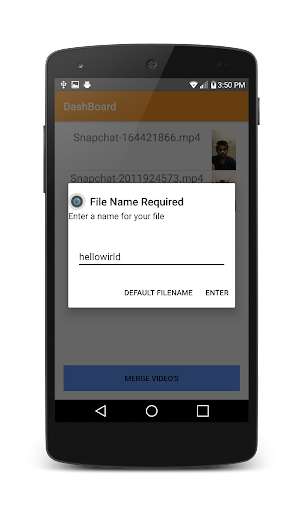
Run this app named Mp4 Merger & Video Merger using MyAndroid.
You can do it using our Android online emulator.
Mp4 Merger & Video Merger is a tool to merger multiple Video files into a one single Video file.The Mp4 Merger will combine the Video files in a sequential fashion and create a one single Video file.The Application will show a dashboard containing all the Video files.
Select the Video file to add in the buffer.
When the Video files are added into the buffer then press the merge button.
All the Video files that has been merged is stored in the memory card in the folder name Mp4Merger in the external memory location.Based on the Video file size the merging process will take time.
1) Add the Video files into the buffer
2) Once the Video files are confirmed
3) Press the merge button to create the final merged file
Key Features:
1) The Application has the fastest Mp4 Merger Engine which will complete the merging process in few seconds
2) All the Video Files are stored in the folder named mergedVideo in the memory card.
3) Built in Video Player.
All the Video files that has been merged can be played using the Video player that has been built along with the application
4) A seperate Help section that will help the user for using the Mp4 Merger and Video merger process.
Select the Video file to add in the buffer.
When the Video files are added into the buffer then press the merge button.
All the Video files that has been merged is stored in the memory card in the folder name Mp4Merger in the external memory location.Based on the Video file size the merging process will take time.
1) Add the Video files into the buffer
2) Once the Video files are confirmed
3) Press the merge button to create the final merged file
Key Features:
1) The Application has the fastest Mp4 Merger Engine which will complete the merging process in few seconds
2) All the Video Files are stored in the folder named mergedVideo in the memory card.
3) Built in Video Player.
All the Video files that has been merged can be played using the Video player that has been built along with the application
4) A seperate Help section that will help the user for using the Mp4 Merger and Video merger process.
MyAndroid is not a downloader online for Mp4 Merger & Video Merger. It only allows to test online Mp4 Merger & Video Merger with apkid my.me.dija.mp4merg.videomerger. MyAndroid provides the official Google Play Store to run Mp4 Merger & Video Merger online.
