

We provide My Pass Man - My Password Manager online (apkid: mmc.security.mypassman) in order to run this application in our online Android emulator.
Description:
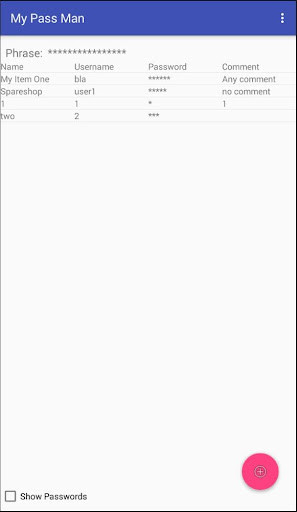
Run this app named My Pass Man - My Password Manager using MyAndroid.
You can do it using our Android online emulator.
Do you have many email accounts, web accounts, PC's with different user accounts or for example FTP accounts? This app can help you.
It can store the names, usernames, passwords and comments for the accounts.
The data is encrypted with highest possible encryption on the phone.
Only the user has access to the data and no one else.
We enforce a high level password for your Pass Phrase to protect your data.
We like it that way.
So how does it work? All you need to do is create a strong Pass Phrase of nothing less than 16 characters.
Now you can start adding and editing user account items for your personal use.
We are not the trusting type so that's why we use this.
Storing usernames and passwords is all it does.
Features:
- Import / Export: You can make an encrypted export backup and re-import them latter.
Beware, don't forget the pass phrase, without it you can not import it.
- If someone is forcing you to handover your phone, you have a Delete All button to delete all your entries.
- Uninstalling: This will delete all your password entries.
So make a backup before you do this.
Its a useful feature if someone is taking your phone willingly or unwillingly.
Hope you like it?
It can store the names, usernames, passwords and comments for the accounts.
The data is encrypted with highest possible encryption on the phone.
Only the user has access to the data and no one else.
We enforce a high level password for your Pass Phrase to protect your data.
We like it that way.
So how does it work? All you need to do is create a strong Pass Phrase of nothing less than 16 characters.
Now you can start adding and editing user account items for your personal use.
We are not the trusting type so that's why we use this.
Storing usernames and passwords is all it does.
Features:
- Import / Export: You can make an encrypted export backup and re-import them latter.
Beware, don't forget the pass phrase, without it you can not import it.
- If someone is forcing you to handover your phone, you have a Delete All button to delete all your entries.
- Uninstalling: This will delete all your password entries.
So make a backup before you do this.
Its a useful feature if someone is taking your phone willingly or unwillingly.
Hope you like it?
MyAndroid is not a downloader online for My Pass Man - My Password Manager. It only allows to test online My Pass Man - My Password Manager with apkid mmc.security.mypassman. MyAndroid provides the official Google Play Store to run My Pass Man - My Password Manager online.
