

We provide Remove and Replace Audio in Video online (apkid: mason.replace.audio) in order to run this application in our online Android emulator.
Description:
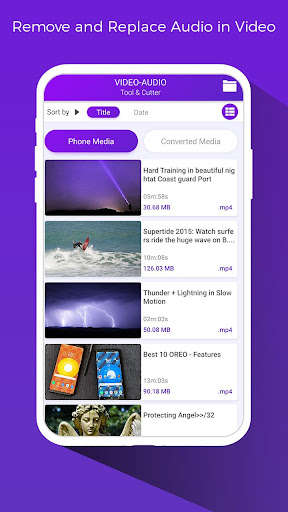
Run this app named Remove and Replace Audio in Video using MyAndroid.
You can do it using our Android online emulator.
By using Remove and Replace Audio in Video you can add or mix your favorite audio files to Video files within a few seconds or minutes.
Remove and Replace Audio in Video is one type of Video editor app.
With this Remove and Replace Audio in Video cum Video Cutter you can also trim Video easily.
This application manage audio file size if the audio file length is larger than Video files, it will be automatically trim audio to Video duration.
If the audio duration is less than Video then audio will be concatenated to Video length.
Remove and Replace Audio in Video provides a facility for changing Background Music of any Video files.
With this you can trim any Video or audio and save them.
Easily change audio of Video file to your custom audio file.
How to:
1> Start mixing audio in your Video
2> Pick any video
3> Load audio file from picker
4> Trim Video / Audio by seek bar
5> Done!!! Create button and Share your mixed Video
: : FEATURES : :
Video can be trimmed
Remove and Replace Audio in Video support music trimming too
Live preview
Delete or Share Video Directly from the list
Smooth UI designs
Supports major available Video and audio Formats
Sharable to mostly social networks
Mix All audio and videos
Also Work as Video Trimmer
Powerful Video and audio mixer
Supports major available Formats
Remove and Replace Audio in Video is one type of Video editor app.
With this Remove and Replace Audio in Video cum Video Cutter you can also trim Video easily.
This application manage audio file size if the audio file length is larger than Video files, it will be automatically trim audio to Video duration.
If the audio duration is less than Video then audio will be concatenated to Video length.
Remove and Replace Audio in Video provides a facility for changing Background Music of any Video files.
With this you can trim any Video or audio and save them.
Easily change audio of Video file to your custom audio file.
How to:
1> Start mixing audio in your Video
2> Pick any video
3> Load audio file from picker
4> Trim Video / Audio by seek bar
5> Done!!! Create button and Share your mixed Video
: : FEATURES : :
Video can be trimmed
Remove and Replace Audio in Video support music trimming too
Live preview
Delete or Share Video Directly from the list
Smooth UI designs
Supports major available Video and audio Formats
Sharable to mostly social networks
Mix All audio and videos
Also Work as Video Trimmer
Powerful Video and audio mixer
Supports major available Formats
MyAndroid is not a downloader online for Remove and Replace Audio in Video. It only allows to test online Remove and Replace Audio in Video with apkid mason.replace.audio. MyAndroid provides the official Google Play Store to run Remove and Replace Audio in Video online.
