
We provide Touch Cockpit Demo online (apkid: kampfner.touch.cockpit.demo) in order to run this application in our online Android emulator.
Description:
Run this app named Touch Cockpit Demo using MyAndroid.
You can do it using our Android online emulator.
With this application you can control your programs running on your Windows PC using your tablet or smartphone.
This is not a yet another virtual keyboard app, if you need one of those, you are at the wrong place, otherwise read on.
Do you play games, use programs in which there are lots of menu commands, keyboard shortcuts to memorize? CAD, flight simulators such as X-Plane, DCS, Microsoft Flight Simulator 2020 etc.
If yes, this app might be useful for you.
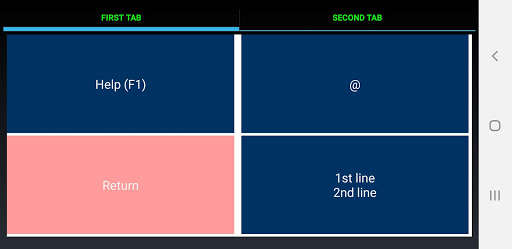
It can show virtual buttons on your mobile device's screen, you can organize them on tabs, and the Windows client program simulates the keystrokes on your PC.
An editor is included so that you can create layout files, but you can use OpenOffice Calc to create layouts as well and the editor will import them.
This is the demo version.
It is limited to two tabs, and four buttons per tab.
Please visit https: //touchcockpit.eu for more information and download the editor and the windows client application from there.
This is not a yet another virtual keyboard app, if you need one of those, you are at the wrong place, otherwise read on.
Do you play games, use programs in which there are lots of menu commands, keyboard shortcuts to memorize? CAD, flight simulators such as X-Plane, DCS, Microsoft Flight Simulator 2020 etc.
If yes, this app might be useful for you.
It can show virtual buttons on your mobile device's screen, you can organize them on tabs, and the Windows client program simulates the keystrokes on your PC.
An editor is included so that you can create layout files, but you can use OpenOffice Calc to create layouts as well and the editor will import them.
This is the demo version.
It is limited to two tabs, and four buttons per tab.
Please visit https: //touchcockpit.eu for more information and download the editor and the windows client application from there.
MyAndroid is not a downloader online for Touch Cockpit Demo. It only allows to test online Touch Cockpit Demo with apkid kampfner.touch.cockpit.demo. MyAndroid provides the official Google Play Store to run Touch Cockpit Demo online.
