
We provide Breli:Reading List Management online (apkid: jp.spl.breli) in order to run this application in our online Android emulator.
Description:
Run this app named Breliï¼Reading List Management using MyAndroid.
You can do it using our Android online emulator.
Breli is a reading management / reading record app recommended for people who want to make reading a habit or who want to read with a fixed deadline.
You can easily register from the barcode on the back cover.
You can record your impressions with reading notes.
You can record the results of your daily readings, and the app will calculate how much you read each day from the results, so you can manage your daily progress.
You can also register the books you want to read and the books you have finished reading, and you can also record reading notes, so you can create your own bookshelf / reading notebook.
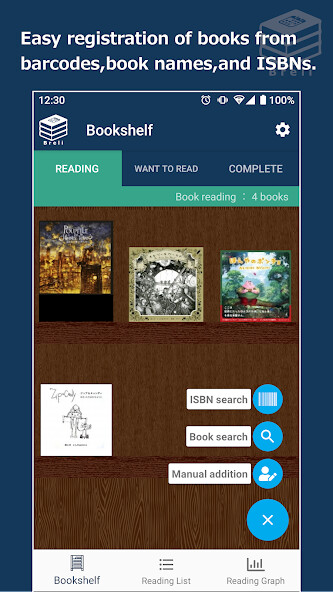
You can easily register a book by scanning the barcode of the book.
(At the first startup, the camera permission pop-up will be displayed, so approve it and press the barcode button again.)
You can search for books to be registered on the bookshelf from the book title or ISBN.
If you cannot search for e-books or old books, you can register the books from the manual registration function.
Books can be registered and managed from the downloaded cover image and camera image.
With the reading memo function, you can leave impressions of words and reading impressions.
(Reading memos are displayed when you select the ?? icon on the calendar screen or a book on the complete reading list.)
You can register the book you want to read and the book you want to read separately.
If you enter the number of days you plan to read the book, the number of pages per day will be calculated, so you can read on a planned and reasonable schedule.
Even if you can't read as planned, the number of pages until the deadline will be recalculated, so you can maintain your motivation.
By visualizing the number of pages to read in a day, you can get a sense of accomplishment in reading.
You can register a reminder to notify you of reading time.
(Notification & Vibration)
---------------------------------------------------------
Books with older publication dates may not be found by ISBN search.
The maximum number of search results displayed is 30.
Other
I want you to display the progress rate
I want a widget
If you have any requests, we will consider adding functions, so please contact us at [email protected].
If you cannot find a book, please contact [email protected] with the "book name" or "ISBN number".
I will translate the app little by little, so please use the English version first.
I'm sorry if the translation is wrong.
You can easily register from the barcode on the back cover.
You can record your impressions with reading notes.
You can record the results of your daily readings, and the app will calculate how much you read each day from the results, so you can manage your daily progress.
You can also register the books you want to read and the books you have finished reading, and you can also record reading notes, so you can create your own bookshelf / reading notebook.
You can easily register a book by scanning the barcode of the book.
(At the first startup, the camera permission pop-up will be displayed, so approve it and press the barcode button again.)
You can search for books to be registered on the bookshelf from the book title or ISBN.
If you cannot search for e-books or old books, you can register the books from the manual registration function.
Books can be registered and managed from the downloaded cover image and camera image.
With the reading memo function, you can leave impressions of words and reading impressions.
(Reading memos are displayed when you select the ?? icon on the calendar screen or a book on the complete reading list.)
You can register the book you want to read and the book you want to read separately.
If you enter the number of days you plan to read the book, the number of pages per day will be calculated, so you can read on a planned and reasonable schedule.
Even if you can't read as planned, the number of pages until the deadline will be recalculated, so you can maintain your motivation.
By visualizing the number of pages to read in a day, you can get a sense of accomplishment in reading.
You can register a reminder to notify you of reading time.
(Notification & Vibration)
---------------------------------------------------------
Books with older publication dates may not be found by ISBN search.
The maximum number of search results displayed is 30.
Other
I want you to display the progress rate
I want a widget
If you have any requests, we will consider adding functions, so please contact us at [email protected].
If you cannot find a book, please contact [email protected] with the "book name" or "ISBN number".
I will translate the app little by little, so please use the English version first.
I'm sorry if the translation is wrong.
MyAndroid is not a downloader online for Breli:Reading List Management. It only allows to test online Breli:Reading List Management with apkid jp.spl.breli. MyAndroid provides the official Google Play Store to run Breli:Reading List Management online.
