

We provide Timers(Sleep Music Timer) online (apkid: jp.co.kirawar.android.simplemusicsleeptimer) in order to run this application in our online Android emulator.
Description:
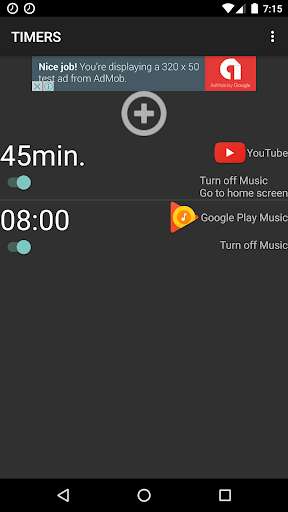
Run this app named Timers(Sleep Music Timer) using MyAndroid.
You can do it using our Android online emulator.
It is an application that can support your sleep and at the same time save the battery power by registering various sleep timers for each different scenes.
It supports a lot of music player apps and Video player apps like Google Play Music, YouTube, radiko, AbemaTV etc.
You can choose the stop options such as turn off music, back to home screen, turn off screen, turn off WiFi, turn off Bluetooth, but also turn on WiFi.
Please register and select the options to suit your needs.
this app allows you to control on/off timer of WiFi and not only stopping music.
Like stopping the music after 50 minutes and turn off the WiFi, turning on WiFi an 6AM, you can freely customize your sleep timer.
How to use
Tap ""button to add new timer.
Set the sleep timer by choosing the time to start the sleep timer, as well as an app to start at the beginning of sleep timer.
Tap to set the time(12: 00 and/or 120min etc.)
On the time change screen, tap the CHANGE to change the time specified mode.
Tap the app name to change the app(like the app selected not to start another app)
Tap the sleep timer option name(stop musicback to home screenturn off screenturn off WiFiturn off Bluetoothturn on WiFi) to change the sleep timer option.
Tap the trash icon which will be shown by tapping the sleep timer to delete a timer.
You can stop/extend the sleep timer in the notification area.
In the setting screen, you can choose to set the sleep timer time as following: "~min later"(relative time) or "at -: --"(absolute time).
In the setting screen, you can sextend the time of the sleep timer.
By marking the check box in the setting screen, it'll enable to "turn off the screen" in the sleep timer option.
To uninstall the app, remove the mark in the check box of enable to "turn off the screen".
In the setting screen, you can change the new sleep timer option that you'll create.
Pieces of this software are under the following licenses:
http: //opensource.org/licenses/mit-license.php
It supports a lot of music player apps and Video player apps like Google Play Music, YouTube, radiko, AbemaTV etc.
You can choose the stop options such as turn off music, back to home screen, turn off screen, turn off WiFi, turn off Bluetooth, but also turn on WiFi.
Please register and select the options to suit your needs.
this app allows you to control on/off timer of WiFi and not only stopping music.
Like stopping the music after 50 minutes and turn off the WiFi, turning on WiFi an 6AM, you can freely customize your sleep timer.
How to use
Tap ""button to add new timer.
Set the sleep timer by choosing the time to start the sleep timer, as well as an app to start at the beginning of sleep timer.
Tap to set the time(12: 00 and/or 120min etc.)
On the time change screen, tap the CHANGE to change the time specified mode.
Tap the app name to change the app(like the app selected not to start another app)
Tap the sleep timer option name(stop musicback to home screenturn off screenturn off WiFiturn off Bluetoothturn on WiFi) to change the sleep timer option.
Tap the trash icon which will be shown by tapping the sleep timer to delete a timer.
You can stop/extend the sleep timer in the notification area.
In the setting screen, you can choose to set the sleep timer time as following: "~min later"(relative time) or "at -: --"(absolute time).
In the setting screen, you can sextend the time of the sleep timer.
By marking the check box in the setting screen, it'll enable to "turn off the screen" in the sleep timer option.
To uninstall the app, remove the mark in the check box of enable to "turn off the screen".
In the setting screen, you can change the new sleep timer option that you'll create.
Pieces of this software are under the following licenses:
http: //opensource.org/licenses/mit-license.php
MyAndroid is not a downloader online for Timers(Sleep Music Timer). It only allows to test online Timers(Sleep Music Timer) with apkid jp.co.kirawar.android.simplemusicsleeptimer. MyAndroid provides the official Google Play Store to run Timers(Sleep Music Timer) online.
