

We provide LadysCalendar wiz Free(Period) online (apkid: info.androidx.lady2calendf) in order to run this application in our online Android emulator.
Description:
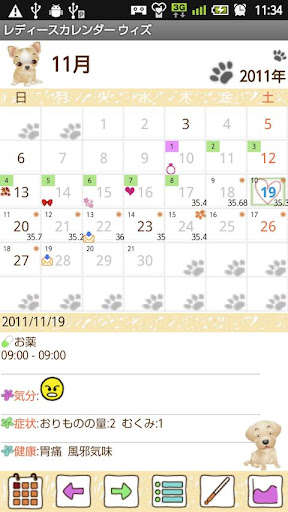
Run this app named LadysCalendar wiz Free(Period) using MyAndroid.
You can do it using our Android online emulator.
This is Ladys Calendar Wiz added schedule management functions to Ladys Calendar!
You can manageMenstruationTemparatureand Healthwith Ladys Calendar!
You can also manage Schedulewith Ladys Calendar Wiz!
You want to a simple app for just managing Menstruation Chose Ladys Calendar Lucid!
You can select from 3 different types of Ladys Calendar and download a favorite one!
Paid-for version Ladys' users, please download first free version of Ladys Wiz.
The advertisement
may not be displayed.
There are 4 different designs DogCatFlower1Flower2and 3 colors.
You can combine
design and color you like to customize the calendar.
Open the Ladys Calendarnot Wiz), press Menu More Backup and select Export SDcard to save the data.
Download free version of Ladys Wiz, Menu Backup Import LadysCalendar to import your data for Ladys Wiz.
Base Setting
1.
The initial window is Base Setting.
2.
Please select a design and a color, set your menstrual cycle, period and day of ovulation.
3.
If you have irregular cycle, please check the checkbox so that it will calculate the cycle the average of past 3 times data.
Press OK, go back to the calendar.
4.
Tap the place Touch here to registerto save your past menstrual data.
Calendar's buttons (from the left)
1.TodaybuttonGo back to the today's date.
2.LeftRightbuttonMove the date left to right.
3.ListbuttonYou can see the list of the saved data.
4.TemperaturebuttonCalculator will pop up.
Enter the temperature.
Press Backbutton of mobile to save the data.
5.GraphbuttonDisplay each graph of TemperatureWeightBlood Pressure.
Registration
1.Menstrual StartCheck here when your period starts.
2.EndCheck here when your period ends.
3.SexCheck here then a heart mark will be displayed on the date.
4.MoodSymptomsHealthbuttonsPress each button to select the daily conditions.
Press Backbutton of the mobile to save the data.
5.Addbuttonleft-bottom button (plus button) is Add button.
Press here to add your daily plans.
6.RepeatbuttonPress right-bottom button to add the repeated plans.
7.
When you save the plans, the saved data will be displayed on the List.
Menu Buttons
1.Base SettingYou can edit Base Setting.
2.PasswordSet a password.
3.MarkYou can add marks on the calendar.
4.Setting MarkYou can select marks that you only use.
5.SettingCustomize the calendar.
6.BackupSave the date to SD card.
Daily Plan Edit Window
Buttons from the left
1.Move upbuttonYou can move up the plan to the previous day.
2.Push backbuttonYou can move the plan to the next day.
3.CheckWhen you have done your plan, then check here so that a red checkmark will be displayed on the calendar.
4.DeleteDelete the plan.
Repeated Plans
1.
Press Repeatbutton of Registration Window.
2.
Move toAlarm ListWindow.
3.
Press New.
4.
Move to Alarm RegistrationWindow.
5.TitleThis title appears on the list of the calendar.
6.MemoYou can save the memo or diary.
7.IconSelected icon will be displayed on the list of the calendar.
You can add marks from Menu button as well.
8.DateWhen you don't enter DateTo, the plan will be repeated endlessly.
9.TimeSet the time.
10.WeekSelect which week has repeat.
All checkboxes should be checked when select a repeat by specified day.
11.Which WeekSelect the week of a repeat.
There are two options.
12.End of MonthWhen you have a repeat at the end of month, check here.
13.Specified dayYou can select specified days to set a repeat.
14.MonthHere, you can set a repeat of once a year event.
15.
AlarmSet the alarm.
16.
When you finish entering all the data, press Savebutton.
17.
You can see saved data on the list of Alarm List.
18.
Press Backbutton of the mobile to go back to the calendar.
You can manageMenstruationTemparatureand Healthwith Ladys Calendar!
You can also manage Schedulewith Ladys Calendar Wiz!
You want to a simple app for just managing Menstruation Chose Ladys Calendar Lucid!
You can select from 3 different types of Ladys Calendar and download a favorite one!
Paid-for version Ladys' users, please download first free version of Ladys Wiz.
The advertisement
may not be displayed.
There are 4 different designs DogCatFlower1Flower2and 3 colors.
You can combine
design and color you like to customize the calendar.
Open the Ladys Calendarnot Wiz), press Menu More Backup and select Export SDcard to save the data.
Download free version of Ladys Wiz, Menu Backup Import LadysCalendar to import your data for Ladys Wiz.
Base Setting
1.
The initial window is Base Setting.
2.
Please select a design and a color, set your menstrual cycle, period and day of ovulation.
3.
If you have irregular cycle, please check the checkbox so that it will calculate the cycle the average of past 3 times data.
Press OK, go back to the calendar.
4.
Tap the place Touch here to registerto save your past menstrual data.
Calendar's buttons (from the left)
1.TodaybuttonGo back to the today's date.
2.LeftRightbuttonMove the date left to right.
3.ListbuttonYou can see the list of the saved data.
4.TemperaturebuttonCalculator will pop up.
Enter the temperature.
Press Backbutton of mobile to save the data.
5.GraphbuttonDisplay each graph of TemperatureWeightBlood Pressure.
Registration
1.Menstrual StartCheck here when your period starts.
2.EndCheck here when your period ends.
3.SexCheck here then a heart mark will be displayed on the date.
4.MoodSymptomsHealthbuttonsPress each button to select the daily conditions.
Press Backbutton of the mobile to save the data.
5.Addbuttonleft-bottom button (plus button) is Add button.
Press here to add your daily plans.
6.RepeatbuttonPress right-bottom button to add the repeated plans.
7.
When you save the plans, the saved data will be displayed on the List.
Menu Buttons
1.Base SettingYou can edit Base Setting.
2.PasswordSet a password.
3.MarkYou can add marks on the calendar.
4.Setting MarkYou can select marks that you only use.
5.SettingCustomize the calendar.
6.BackupSave the date to SD card.
Daily Plan Edit Window
Buttons from the left
1.Move upbuttonYou can move up the plan to the previous day.
2.Push backbuttonYou can move the plan to the next day.
3.CheckWhen you have done your plan, then check here so that a red checkmark will be displayed on the calendar.
4.DeleteDelete the plan.
Repeated Plans
1.
Press Repeatbutton of Registration Window.
2.
Move toAlarm ListWindow.
3.
Press New.
4.
Move to Alarm RegistrationWindow.
5.TitleThis title appears on the list of the calendar.
6.MemoYou can save the memo or diary.
7.IconSelected icon will be displayed on the list of the calendar.
You can add marks from Menu button as well.
8.DateWhen you don't enter DateTo, the plan will be repeated endlessly.
9.TimeSet the time.
10.WeekSelect which week has repeat.
All checkboxes should be checked when select a repeat by specified day.
11.Which WeekSelect the week of a repeat.
There are two options.
12.End of MonthWhen you have a repeat at the end of month, check here.
13.Specified dayYou can select specified days to set a repeat.
14.MonthHere, you can set a repeat of once a year event.
15.
AlarmSet the alarm.
16.
When you finish entering all the data, press Savebutton.
17.
You can see saved data on the list of Alarm List.
18.
Press Backbutton of the mobile to go back to the calendar.
MyAndroid is not a downloader online for LadysCalendar wiz Free(Period). It only allows to test online LadysCalendar wiz Free(Period) with apkid info.androidx.lady2calendf. MyAndroid provides the official Google Play Store to run LadysCalendar wiz Free(Period) online.
