

We provide Castbox Locker: Easy Driving online (apkid: fm.castbox.theme.car.playback.easy.drive.mode) in order to run this application in our online Android emulator.
Description:
Run this app named Castbox Locker: Easy Driving using MyAndroid.
You can do it using our Android online emulator.
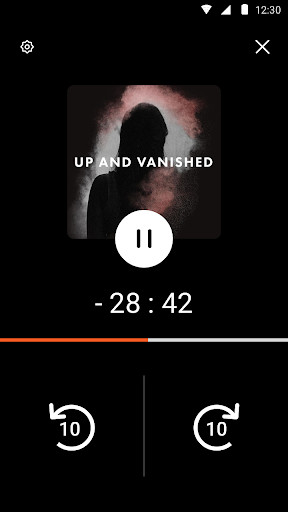
Car mode for Castbox: a lock screen specially designed for car drivers to access their favorite Castbox podcast easily and safely.
Castbox Car mode gives you control of your Castbox podcast even after your screen is locked.
With its distraction-free design, Castbox Car Mode ensures a safe trip for car drivers while playing their favorite podcasts.
Key features:
Customized Large Button Design : car mode allows car drivers to control their podcast without needing to target a precise location on their phone, simply touch anywhere in the button area.
Vertical & Horizontal Mode : car mode works in both orientations to adapt to different viewing angles
Fingerprint unlock supported : The screen lock offers fingerprint unlock option.
With just one tap, you can unlock the playscreen without needing to swipe.
To use this widget, please follow the following steps:
1.
Download and install the theme;
2.
Install Castbox on your Android phone;
3.
Launch Castbox, go to Themes under Settings, open this theme, and apply it.
Castbox Car mode gives you control of your Castbox podcast even after your screen is locked.
With its distraction-free design, Castbox Car Mode ensures a safe trip for car drivers while playing their favorite podcasts.
Key features:
Customized Large Button Design : car mode allows car drivers to control their podcast without needing to target a precise location on their phone, simply touch anywhere in the button area.
Vertical & Horizontal Mode : car mode works in both orientations to adapt to different viewing angles
Fingerprint unlock supported : The screen lock offers fingerprint unlock option.
With just one tap, you can unlock the playscreen without needing to swipe.
To use this widget, please follow the following steps:
1.
Download and install the theme;
2.
Install Castbox on your Android phone;
3.
Launch Castbox, go to Themes under Settings, open this theme, and apply it.
MyAndroid is not a downloader online for Castbox Locker: Easy Driving. It only allows to test online Castbox Locker: Easy Driving with apkid fm.castbox.theme.car.playback.easy.drive.mode. MyAndroid provides the official Google Play Store to run Castbox Locker: Easy Driving online.
