
We provide Digital Signature Maker online (apkid: digitalsignature.signmaker.signcreator.documentsign) in order to run this application in our online Android emulator.
Description:
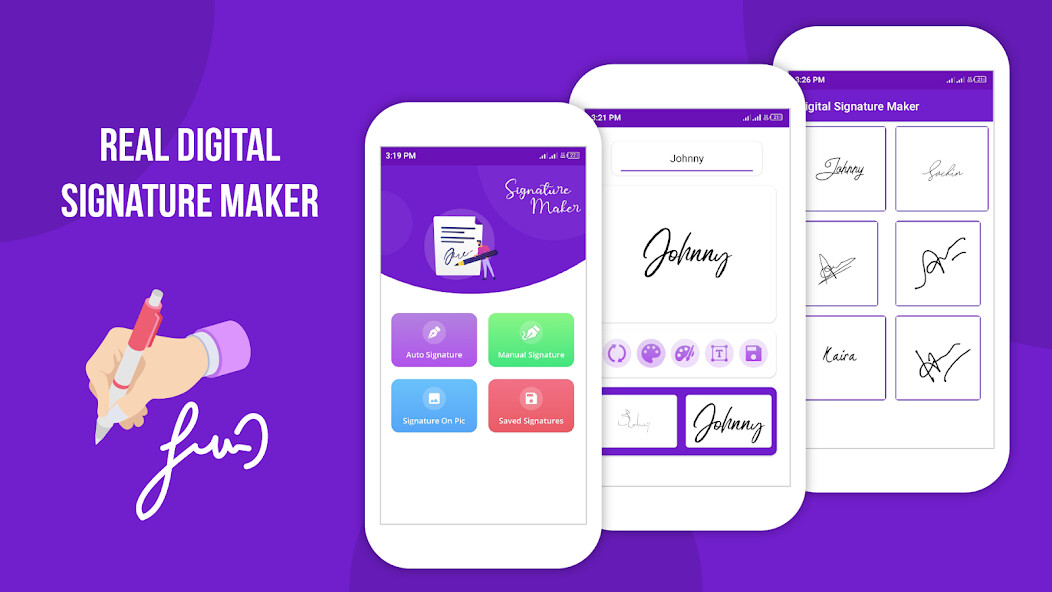
Run this app named Digital Signature Maker using MyAndroid.
You can do it using our Android online emulator.
Digital Signature Maker provides you easy way to create your own Sign / Signature in few seconds.
You can Sign your Documents, PDF files, Pictures, Photos, Images and share on Social network or Store in SD-Card.
Create your Own unique Style Signature very smoothly i.e.
(Digital Signature, E Signature, Signature Creator, Signature Maker)
Features:
Create your own Signature
- Clear (Erase Signature or Re-Draw Signature)
- Save your Signature with Name (in your Phone or SD card)
- Select your Favorite Color (Color picker is also included which provides many colors)
- Choose Input Size ( Brush size would be Very small, Small, Medium, Large, Very Large)
Open Signature
- view Signature Gallery
- Delete (Signature file)
- Share (share Signature with any Social Apps installed in your Phone)
More
- Perfect Quality and Graphics
- Very Small Size App
- Easy to Use
- Free and liteweight App
NOTE: This Digital Signature Maker app is NOT meant for any kind of legal use (You may NOT use them to sign your cheques, Cash, Important Documents, equity loan, Bank Papers, loan Papers etc).
We will not be responsible for any damage.
You can tell us our weak point, so we can improve our work and provide you more perfect quality work.
You can Sign your Documents, PDF files, Pictures, Photos, Images and share on Social network or Store in SD-Card.
Create your Own unique Style Signature very smoothly i.e.
(Digital Signature, E Signature, Signature Creator, Signature Maker)
Features:
Create your own Signature
- Clear (Erase Signature or Re-Draw Signature)
- Save your Signature with Name (in your Phone or SD card)
- Select your Favorite Color (Color picker is also included which provides many colors)
- Choose Input Size ( Brush size would be Very small, Small, Medium, Large, Very Large)
Open Signature
- view Signature Gallery
- Delete (Signature file)
- Share (share Signature with any Social Apps installed in your Phone)
More
- Perfect Quality and Graphics
- Very Small Size App
- Easy to Use
- Free and liteweight App
NOTE: This Digital Signature Maker app is NOT meant for any kind of legal use (You may NOT use them to sign your cheques, Cash, Important Documents, equity loan, Bank Papers, loan Papers etc).
We will not be responsible for any damage.
You can tell us our weak point, so we can improve our work and provide you more perfect quality work.
MyAndroid is not a downloader online for Digital Signature Maker. It only allows to test online Digital Signature Maker with apkid digitalsignature.signmaker.signcreator.documentsign. MyAndroid provides the official Google Play Store to run Digital Signature Maker online.
