

We provide Video Splitter - Story Split online (apkid: com.zeehikitzon.videosplitter) in order to run this application in our online Android emulator.
Description:
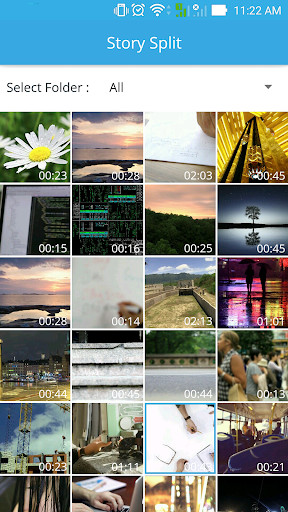
Run this app named Video Splitter - Story Split using MyAndroid.
You can do it using our Android online emulator.
Video splitter Story split help you to split Video based on duration on mobiles is very difficult, now with this app you can split your videos based on duration within moments, And it will work completely offline, So no network data is used.
Video Splitter works offline, so no data waste or needed by this app.
Split/trim videos for any social media.
Video Splitter splits your videos with simple steps and save files to your phones memory(Gallery).
Video Splitter/Slicer maintains the original quality of the Video after processing.
Split and Post your complete stories by splitting long videos into parts of 30 second videos or custom duration videos.
Video Splitter allows you to do
1.
WhatsApp Split
- Split your Video into 30 seconds slice automatically.
2.
Custom Split
- Customize time duration of videos to be split.
3.
Single Split
- Select start & end time and cut your video.
Features of Video splitter story split app:
One mobile application to update Video status on all social media platforms or chat messengers
\tVery useful when you need to share large Video in social network in small parts.
\tBy Custom Split option You can split the videos to the length you need.
Option to set the duration manually.
\tSingle Split option provides you awesome Video status cutter.
Video Splitter provide to split Video as same size that you want.
\tSplit Video store into file storage.
\t Trim your Video right on your device
\tSplit the Video into any parts based on the duration you set for each part.
\tPreview the Video result from the App directly.
\t No watermark in output.
\tShare single or multiple Video directly from the App.
\tNo time limit in 'Video Splitter'.
How To Use Video splitter:
When you want to post a lengthy Video to social media app, open Video Splitter, choose the Import Video option
Select the Video file you want from the gallery or file manager
You can select the split option if you are splitting the videos for any social media status.
Tap on SAVE - You will be asked if you want to split into 15 seconds or 30 seconds.
If you want any other status Video length, choose the Custom Split option.
Move the slider and select a chunk size, tap SAVE.
Video Cutter
Select start & end time and cut your video.
if you struggle every time for spliting Video while posting your videos to social media, then Video Splitter is the perfect app for you.
It is very quick, easy app for sending BIG VIDEOS to Social Media Networks.TRY NOW!!!!
Your feedback and suggestions are always welcome
Thank you for choosing Video splitter story split.
Video Splitter works offline, so no data waste or needed by this app.
Split/trim videos for any social media.
Video Splitter splits your videos with simple steps and save files to your phones memory(Gallery).
Video Splitter/Slicer maintains the original quality of the Video after processing.
Split and Post your complete stories by splitting long videos into parts of 30 second videos or custom duration videos.
Video Splitter allows you to do
1.
WhatsApp Split
- Split your Video into 30 seconds slice automatically.
2.
Custom Split
- Customize time duration of videos to be split.
3.
Single Split
- Select start & end time and cut your video.
Features of Video splitter story split app:
One mobile application to update Video status on all social media platforms or chat messengers
\tVery useful when you need to share large Video in social network in small parts.
\tBy Custom Split option You can split the videos to the length you need.
Option to set the duration manually.
\tSingle Split option provides you awesome Video status cutter.
Video Splitter provide to split Video as same size that you want.
\tSplit Video store into file storage.
\t Trim your Video right on your device
\tSplit the Video into any parts based on the duration you set for each part.
\tPreview the Video result from the App directly.
\t No watermark in output.
\tShare single or multiple Video directly from the App.
\tNo time limit in 'Video Splitter'.
How To Use Video splitter:
When you want to post a lengthy Video to social media app, open Video Splitter, choose the Import Video option
Select the Video file you want from the gallery or file manager
You can select the split option if you are splitting the videos for any social media status.
Tap on SAVE - You will be asked if you want to split into 15 seconds or 30 seconds.
If you want any other status Video length, choose the Custom Split option.
Move the slider and select a chunk size, tap SAVE.
Video Cutter
Select start & end time and cut your video.
if you struggle every time for spliting Video while posting your videos to social media, then Video Splitter is the perfect app for you.
It is very quick, easy app for sending BIG VIDEOS to Social Media Networks.TRY NOW!!!!
Your feedback and suggestions are always welcome
Thank you for choosing Video splitter story split.
MyAndroid is not a downloader online for Video Splitter - Story Split. It only allows to test online Video Splitter - Story Split with apkid com.zeehikitzon.videosplitter. MyAndroid provides the official Google Play Store to run Video Splitter - Story Split online.
