

We provide Notebook+ "Evernote" client application. online (apkid: com.yu.notebook.plus) in order to run this application in our online Android emulator.
Description:
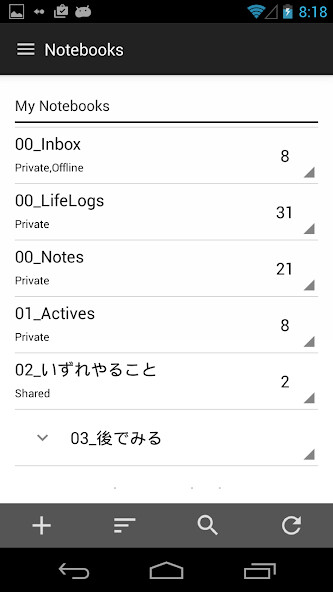
Run this app named Notebook+ "Evernote" client application.
using MyAndroid.
You can do it using our Android online emulator.
"Notebook+" is "Evernote" client application.
As much as possible, we created aware of the UI to be easy to operate with one hand.
Without put what you need for operations such as buttons at the top of the screen,
What you need for an operation we have placed at the bottom of the screen from the center of the screen.
The best feature is,
It is a function of the premium user limited in the official app,
This is where you can also use free user "Offline Notebook" feature!
Please utilize all means.
Function as Evernote client basic, are as follows.
Full synchronization of notebooks, tags, notes, and savedserches
Create a New notebooks, tags, notes, and savedserches
Edit notebooks, tags, notes, and savedserches
Save the file, attached
Editing tag information and notebook information of note
Search Notes
Browse the title list screen notebook, tag list screen, in the notes list screen
It is the only notes for delete function(I will ask Evernote official demand, the more)
Notes sharing
Reminder
In addition, we also equipped with features such as: .
The return to swipe from left to right notes list screen, notebook display screen, the setting screen
An easy-to-view by swiping from the right edge to the left for more information notes
Because it is going to continue to add features that you think is still not enough in future versions,
Please try it once by all means!
In future versions,
Shortcut(EvernoteAPI to respond as soon as development scheduled to start)
Encrypt and decrypt a string(EvernoteAPI to respond as soon as development scheduled to start)
We intended for this smart phone application currently.
Please keep in mind that it does not correspond to the 10inch tablet.
As much as possible, we created aware of the UI to be easy to operate with one hand.
Without put what you need for operations such as buttons at the top of the screen,
What you need for an operation we have placed at the bottom of the screen from the center of the screen.
The best feature is,
It is a function of the premium user limited in the official app,
This is where you can also use free user "Offline Notebook" feature!
Please utilize all means.
Function as Evernote client basic, are as follows.
Full synchronization of notebooks, tags, notes, and savedserches
Create a New notebooks, tags, notes, and savedserches
Edit notebooks, tags, notes, and savedserches
Save the file, attached
Editing tag information and notebook information of note
Search Notes
Browse the title list screen notebook, tag list screen, in the notes list screen
It is the only notes for delete function(I will ask Evernote official demand, the more)
Notes sharing
Reminder
In addition, we also equipped with features such as: .
The return to swipe from left to right notes list screen, notebook display screen, the setting screen
An easy-to-view by swiping from the right edge to the left for more information notes
Because it is going to continue to add features that you think is still not enough in future versions,
Please try it once by all means!
In future versions,
Shortcut(EvernoteAPI to respond as soon as development scheduled to start)
Encrypt and decrypt a string(EvernoteAPI to respond as soon as development scheduled to start)
We intended for this smart phone application currently.
Please keep in mind that it does not correspond to the 10inch tablet.
MyAndroid is not a downloader online for Notebook+ "Evernote" client application.. It only allows to test online Notebook+ "Evernote" client application. with apkid com.yu.notebook.plus. MyAndroid provides the official Google Play Store to run Notebook+ "Evernote" client application. online.
