

We provide Voucher and Coupon Manager online (apkid: com.yinqs.vouchermanager) in order to run this application in our online Android emulator.
Description:
Run this app named Voucher and Coupon Manager using MyAndroid.
You can do it using our Android online emulator.
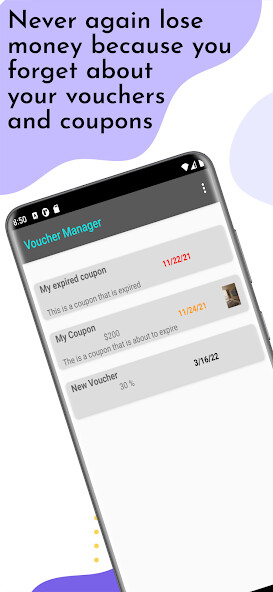
Voucher and Coupon Manager is an app that allows you to manage all your vouchers and coupons in an app.
You will be reminded when a voucher is about to expire so you won't forget to use it and never again lose money because you have too many vouchers to keep track of them all.
The app will give you a full overview of all your vouchers sorted by their expiration date.
The app has a lot of fields.
None of them is mandatory, so you can fill as much or as less information as you want.
You can add the following fields:
- name: A name of your choice
- description: A long description of the voucher
- conditions: Do any conditions apply?
- a code that you can scan with a built-in QR and barcode scanner: Even if you would lose the voucher itself this might save you and make sure you can still use it.
- expiration date: The voucher probably expires at some point.
- amount: The total amount
- remaining amount: If the already used a part of the voucher you can use this field to enter the remaining amount
- percentage: if the coupon doesn't represent an amount, but instead a percentage, you can use this field
- set up to 3 alarms to notify you when the coupon will almost expire: Set a number of days, weeks or months
- add a photo by either taking a picture with your camera or pick one from the gallery: you can add a photo of the voucher itself or something else that might help you.
Enjoy having a nice overview of all your vouchers and never again forget to use them!
You will be reminded when a voucher is about to expire so you won't forget to use it and never again lose money because you have too many vouchers to keep track of them all.
The app will give you a full overview of all your vouchers sorted by their expiration date.
The app has a lot of fields.
None of them is mandatory, so you can fill as much or as less information as you want.
You can add the following fields:
- name: A name of your choice
- description: A long description of the voucher
- conditions: Do any conditions apply?
- a code that you can scan with a built-in QR and barcode scanner: Even if you would lose the voucher itself this might save you and make sure you can still use it.
- expiration date: The voucher probably expires at some point.
- amount: The total amount
- remaining amount: If the already used a part of the voucher you can use this field to enter the remaining amount
- percentage: if the coupon doesn't represent an amount, but instead a percentage, you can use this field
- set up to 3 alarms to notify you when the coupon will almost expire: Set a number of days, weeks or months
- add a photo by either taking a picture with your camera or pick one from the gallery: you can add a photo of the voucher itself or something else that might help you.
Enjoy having a nice overview of all your vouchers and never again forget to use them!
MyAndroid is not a downloader online for Voucher and Coupon Manager. It only allows to test online Voucher and Coupon Manager with apkid com.yinqs.vouchermanager. MyAndroid provides the official Google Play Store to run Voucher and Coupon Manager online.
