
We provide Compass online (apkid: com.world.compass) in order to run this application in our online Android emulator.
Description:
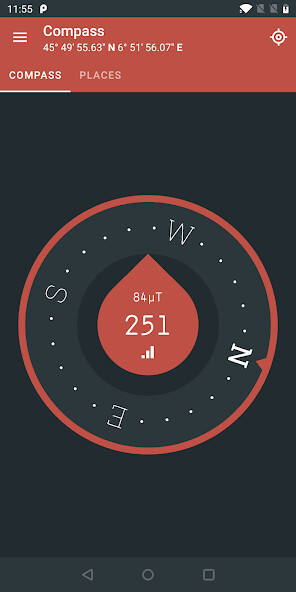
Run this app named Compass using MyAndroid.
You can do it using our Android online emulator.
A clean, intuitive and beautiful multi-function compass!
Function list:
- Provide information on compass, latitude and longitude, geographic location, etc.
- Multiple theme switching at any time, free to choose compass skin
- Support location sharing, send your information to friends, let friends know where you are
- Small size and very few permissions
- Fast positioning speed and small positioning accuracy error
- Simple and clean interface
- Support compass calibration instructions
- Support level function, mobile phone can also be used as level
- Support my positioning function, display current location, latitude and longitude and map information
- Support map function, display surrounding traffic information, real-time traffic information, satellite map display
To display latitude and longitude and geographic location information, select "Allow" when you see the Need to get your location information dialog.
Tips: In order for the compass to accurately align the north direction, it is recommended that you stand in an open place, the screen of the mobile phone is facing the sky, in front of you, holding the shape of the phone with a figure of 8 characters.
Draw 2 times, then face the screen yourself, draw 8 words, 2 times, so you can correct the compass.
Function list:
- Provide information on compass, latitude and longitude, geographic location, etc.
- Multiple theme switching at any time, free to choose compass skin
- Support location sharing, send your information to friends, let friends know where you are
- Small size and very few permissions
- Fast positioning speed and small positioning accuracy error
- Simple and clean interface
- Support compass calibration instructions
- Support level function, mobile phone can also be used as level
- Support my positioning function, display current location, latitude and longitude and map information
- Support map function, display surrounding traffic information, real-time traffic information, satellite map display
To display latitude and longitude and geographic location information, select "Allow" when you see the Need to get your location information dialog.
Tips: In order for the compass to accurately align the north direction, it is recommended that you stand in an open place, the screen of the mobile phone is facing the sky, in front of you, holding the shape of the phone with a figure of 8 characters.
Draw 2 times, then face the screen yourself, draw 8 words, 2 times, so you can correct the compass.
MyAndroid is not a downloader online for Compass. It only allows to test online Compass with apkid com.world.compass. MyAndroid provides the official Google Play Store to run Compass online.
