

We provide Floating Apps online (apkid: com.wilco375.recentsfloatingapps) in order to run this application in our online Android emulator.
Description:
Run this app named Floating Apps using MyAndroid.
You can do it using our Android online emulator.
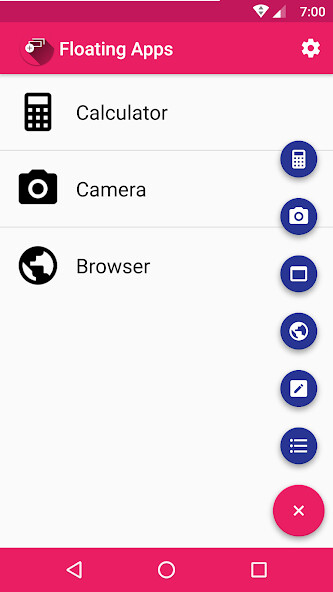
This app adds floating apps which you can start in several ways.
Current floating apps
Calculator
Camera
Widget - Launch a widget from any app in a floating window
Browser
Note - Write and save notes
Todo List
How it works
You add floating apps by clicking the plus button, and then the app you want to add to the list.
After that you can launch the app by clicking the list item.
You can also add a quick settings tile to your status bar that launches the app if you are using at least Android 7.0.
If you are using Xposed you can also get a floating action button on your Recent Apps screen from which you can launch the floating apps in your list.
The free version is limited to three floating apps at a time.
If you want to use more floating apps, please consider purchasing the pro version and support the development of this app.
Current floating apps
Calculator
Camera
Widget - Launch a widget from any app in a floating window
Browser
Note - Write and save notes
Todo List
How it works
You add floating apps by clicking the plus button, and then the app you want to add to the list.
After that you can launch the app by clicking the list item.
You can also add a quick settings tile to your status bar that launches the app if you are using at least Android 7.0.
If you are using Xposed you can also get a floating action button on your Recent Apps screen from which you can launch the floating apps in your list.
The free version is limited to three floating apps at a time.
If you want to use more floating apps, please consider purchasing the pro version and support the development of this app.
MyAndroid is not a downloader online for Floating Apps. It only allows to test online Floating Apps with apkid com.wilco375.recentsfloatingapps. MyAndroid provides the official Google Play Store to run Floating Apps online.
