
We provide Argus TV Remote online (apkid: com.whitestarlogic.argustvcontroller) in order to run this application in our online Android emulator.
Description:
Run this app named Argus TV Remote using MyAndroid.
You can do it using our Android online emulator.
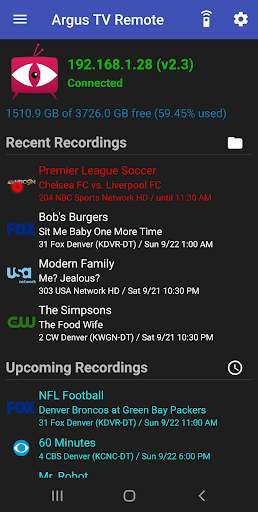
Argus TV Remote is a fully functional Android client for the Argus TV smart TV recording suite, with the ability to manage recordings, browse the program guide, create recording schedules, and watch recordings on your Android device.
In addition, it has the ability to select a recording and cast it to any Kodi instance running on the same network.
It supports Live TV, and also has an integrated Kodi remote control which will lets you control Kodi while playing back recordings.
Features
- Watch recordings on your device.
- Cast recordings to Kodi.
- Has a built in remote control for Kodi.
- Supports Live TV, both viewing on the device and casting to Kodi.
- See active recordings, browse and manage previous recordings.
- Browse and search the program guide.
- Create and manage recording schedules.
- Show alerts when recordings start and finish, or when schedules change.
Requirements
- Your device must be running Android Lolipop (Version 5.0) or higher.
- You must have an Argus TV server installed and running on your local network.
See: https: //www.argus-tv.com.
- To watch recordings and/or Live TV, you must have a Video player installed on your device that suppports playing transport stream files (.ts) from network shares and (optionally) supports playing RTSP streams.
- To cast recordings to Kodi, you must have an instance of Kodi 13.0 (Gotham) or higher installed and running on your local network.
- To watch recordings and/or cast them to Kodi, you must have Argus TV configured to use UNC paths (i.e.
\\\\Server\\Share) for recording files.
In addition, it has the ability to select a recording and cast it to any Kodi instance running on the same network.
It supports Live TV, and also has an integrated Kodi remote control which will lets you control Kodi while playing back recordings.
Features
- Watch recordings on your device.
- Cast recordings to Kodi.
- Has a built in remote control for Kodi.
- Supports Live TV, both viewing on the device and casting to Kodi.
- See active recordings, browse and manage previous recordings.
- Browse and search the program guide.
- Create and manage recording schedules.
- Show alerts when recordings start and finish, or when schedules change.
Requirements
- Your device must be running Android Lolipop (Version 5.0) or higher.
- You must have an Argus TV server installed and running on your local network.
See: https: //www.argus-tv.com.
- To watch recordings and/or Live TV, you must have a Video player installed on your device that suppports playing transport stream files (.ts) from network shares and (optionally) supports playing RTSP streams.
- To cast recordings to Kodi, you must have an instance of Kodi 13.0 (Gotham) or higher installed and running on your local network.
- To watch recordings and/or cast them to Kodi, you must have Argus TV configured to use UNC paths (i.e.
\\\\Server\\Share) for recording files.
MyAndroid is not a downloader online for Argus TV Remote. It only allows to test online Argus TV Remote with apkid com.whitestarlogic.argustvcontroller. MyAndroid provides the official Google Play Store to run Argus TV Remote online.
