

We provide Whisker online (apkid: com.whisker.android) in order to run this application in our online Android emulator.
Description:
Run this app named Whisker using MyAndroid.
You can do it using our Android online emulator.
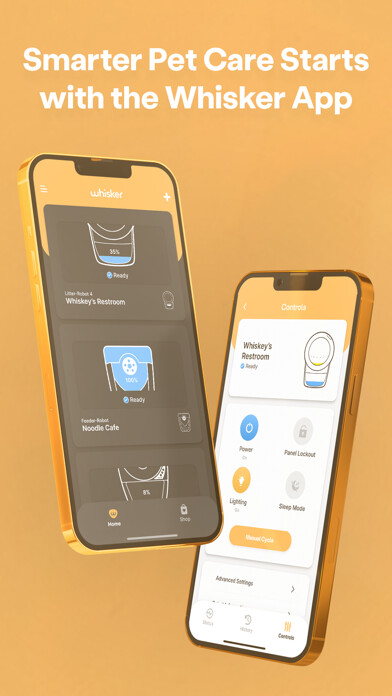
Whisker app allows you to remotely monitor and control your WiFi-enabled Litter-Robot unit(s) and Feeder-Robot unit(s) all in one place.
This app brings you data about your cats litter box usage and your pet's feeding habits, giving you full control of your Litter-Robot 3 Connect and Feeder-Robot right from your phone.
Whisker app for the Litter-Robot 4 and Litter-Robot 3 Connect
View the Waste Drawer Level: Keep the litter box out of sight but not out of mind.
Check the waste drawer level from wherever you are.
Get Real-Time Status Updates: Turn on push notifications to know when your Litter-Robot needs your attention.
Customize alerts to find out when it's cycling, the drawer is full, or the unit is paused.
Monitor Your Cat's Litter Box Usage: View usage stats for insights into your cat's health.
Learn what's normal for your cat, so you can identify when something might be wrong.
Manage Your Litter-Robot Settings: Customize your settings right from your phone.
Adjust the wait time, lock out the control panel, activate the night light, or schedule sleep mode.
Connect Multiple Units: Onboard a single Litter-Robot or Feeder-Robot, or multiple units to the same app.
Others in your household want to connect? Simply use the same account.
Whisker app for the Feeder-Robot
Customize Multiple Feed Schedules: The app gives you even more customizable programming options for multiple feeding schedules.
You can also give a snack or skip meals with the touch of a button.
See Feeder Status: Receive notifications for when youre getting low on food, as well as alerts for if theres an issue detected with your automatic feeder.
Get Feeding Insights: Ensure your pet is receiving the right amount of food at the right time.
Compare your pets weekly and monthly feeding stats for high-level insights.
Give Your Pet A Snack: Give your pet a snack anytime, from anywhere, at the touch of a button.
Snacks dispense in 1/4-cup increments up to 1 cup total.
Connect Multiple Units: Onboard a single Feeder-Robot or Litter-Robot, or multiple units to the same app.
Others in your household want to connect? Simply use the same account.
Requirements:
Requires Android 8.0 or later
Requires camera permissions to scan QR code
2.4GHz connection required (5GHz not supported)
IPv4 router required (IPv6 not supported)
Please make sure you complete the onboarding process within 5 minutes
SSID network names must be under 31 characters
Network passwords must be between 8-31 characters and cannot have slashes, periods or spaces ( \ / .
)
Robots will not connect to hidden networks
MAC address is visible during feeder-robot onboarding
Robots will only connect to secure password protected networks
Robots do not use share WiFi network phone features
This app brings you data about your cats litter box usage and your pet's feeding habits, giving you full control of your Litter-Robot 3 Connect and Feeder-Robot right from your phone.
Whisker app for the Litter-Robot 4 and Litter-Robot 3 Connect
View the Waste Drawer Level: Keep the litter box out of sight but not out of mind.
Check the waste drawer level from wherever you are.
Get Real-Time Status Updates: Turn on push notifications to know when your Litter-Robot needs your attention.
Customize alerts to find out when it's cycling, the drawer is full, or the unit is paused.
Monitor Your Cat's Litter Box Usage: View usage stats for insights into your cat's health.
Learn what's normal for your cat, so you can identify when something might be wrong.
Manage Your Litter-Robot Settings: Customize your settings right from your phone.
Adjust the wait time, lock out the control panel, activate the night light, or schedule sleep mode.
Connect Multiple Units: Onboard a single Litter-Robot or Feeder-Robot, or multiple units to the same app.
Others in your household want to connect? Simply use the same account.
Whisker app for the Feeder-Robot
Customize Multiple Feed Schedules: The app gives you even more customizable programming options for multiple feeding schedules.
You can also give a snack or skip meals with the touch of a button.
See Feeder Status: Receive notifications for when youre getting low on food, as well as alerts for if theres an issue detected with your automatic feeder.
Get Feeding Insights: Ensure your pet is receiving the right amount of food at the right time.
Compare your pets weekly and monthly feeding stats for high-level insights.
Give Your Pet A Snack: Give your pet a snack anytime, from anywhere, at the touch of a button.
Snacks dispense in 1/4-cup increments up to 1 cup total.
Connect Multiple Units: Onboard a single Feeder-Robot or Litter-Robot, or multiple units to the same app.
Others in your household want to connect? Simply use the same account.
Requirements:
Requires Android 8.0 or later
Requires camera permissions to scan QR code
2.4GHz connection required (5GHz not supported)
IPv4 router required (IPv6 not supported)
Please make sure you complete the onboarding process within 5 minutes
SSID network names must be under 31 characters
Network passwords must be between 8-31 characters and cannot have slashes, periods or spaces ( \ / .
)
Robots will not connect to hidden networks
MAC address is visible during feeder-robot onboarding
Robots will only connect to secure password protected networks
Robots do not use share WiFi network phone features
MyAndroid is not a downloader online for Whisker. It only allows to test online Whisker with apkid com.whisker.android. MyAndroid provides the official Google Play Store to run Whisker online.
