
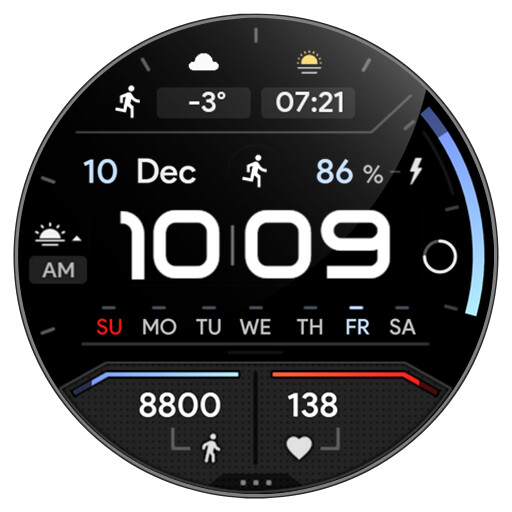
We provide Awf TRON [dark] - watch face online (apkid: com.watchfacestudio.awftrondark) in order to run this application in our online Android emulator.
Description:
![Run android online APK Awf TRON [dark] - watch face from MyAndroid or emulate Awf TRON [dark] - watch face using MyAndroid](https://images.myandroid.org/images/awftron[dark]watchfacescreen1.jpg "Run android online APK Awf TRON [dark] - watch face from MyAndroid or emulate Awf TRON [dark] - watch face using MyAndroid")
Run this app named Awf TRON [dark] - watch face using MyAndroid.
You can do it using our Android online emulator.
Only for Wear OS devices - API 28+
https: //amoledwatchfaces.com
BUY ONE GET ONE OFFER !
https: //amoledwatchfaces.com/BOGO.webp
ADDITIONAL COMPLICATION APPS
Heart Rate: https: //bit.ly/3OTRPCH
Distance, Calories, Floors: https: //bit.ly/3OULtDb
Complications Suite: https: //bit.ly/3yuRwr1
Phone Battery: https: //bit.ly/3c31hoz
FEATURES
true black background
progress circle seconds indicator
charging / critical battery indicator
high resolution
day of week indicator
moon phase indicator: https: //bit.ly/3yuRwr1
phone battery complication: https: //bit.ly/3c31hoz
many gradient color customization options
colors editable in customization menu (savable color settings)
PNGQuant optimized layers > battery friendly
custom shortcut for preferable health app (steps)
simple ambient mode with low OPR & adaptive colors
2x custom complications (SHORT_TEXT with 3 layouts)
2x ICON type complication
For full functionality please manually enable Sensors & Receive complication data permissions !
NOTE ! Watch face has an automatic 60 minute interval heart rate measurement implemented.
Heart rate measurement is currently independent of measurements from other applications.
Manual measurement is also possible - tap on heart rate (measuring indicator implemented)
CUSTOM COMPLICATIONS
2x on top - editable in watch face settings (long-press)
(SHORT_TEXT with 3 layouts)
2x ICON type
BAR INDICATORS
battery - % - 0 >> 100
steps goal % - fixed - 0 >> 10000 STEPS
heart rate - 50 >> 150 BPM
APP SHORTCUTS
heart rate - tap to measure HR (watch needs to be on wrist)
steps - custom app shortcut (editable in customization menu)
am/pm - open alarm
battery % - open battery status
date - open calendar
COLOR CUSTOMIZATION
NOTE! to customize digital time color you need to enable digital colors (long-press customization menu - enable digital colors)
10x colors for some text elements (Color)
battery bar + steps bar colors >> arctic blue, wavy green, lime green, flame red, sunrise orange, nebula purple
- available through watch face settings menu (long-press watch center)
(sRGB corrected colors for perfect view on amoled screens)
WATCH FACE SETTINGS
long press watch middle spot > open customization settings
1.
Digital colors - only works when enable digital colors is turned on (2nd position) !
2.
Enable digital colors (default disabled == white digitals)
3.
Steps bar color (6x)
4.
Battery bar color (6x)
5.
Seconds Progress Bar (On / Off)
6.
AOD Style (Dimmed, Time only)
7.
Color (10x)
8.
Custom complications (app shortcuts too)
Phone app serves only as an placeholder to make it easier to install & find the watch face on your Wear OS watch.
You have to select your watch device from the install dropdown menu
Please send any issues reports or help requests to our support address
[email protected]
We appreciate your feedback !
DEVELOPER PAGE
https: //play.google.com/store/apps/dev?id=5591589606735981545
TELEGRAM
https: //t.me/amoledwatchfaces
INSTAGRAM
https: //instagram.com/amoledwatchfaces
FACEBOOK
https: //facebook.com/amoledwatchfaces
https: //amoledwatchfaces.com
BUY ONE GET ONE OFFER !
https: //amoledwatchfaces.com/BOGO.webp
ADDITIONAL COMPLICATION APPS
Heart Rate: https: //bit.ly/3OTRPCH
Distance, Calories, Floors: https: //bit.ly/3OULtDb
Complications Suite: https: //bit.ly/3yuRwr1
Phone Battery: https: //bit.ly/3c31hoz
FEATURES
true black background
progress circle seconds indicator
charging / critical battery indicator
high resolution
day of week indicator
moon phase indicator: https: //bit.ly/3yuRwr1
phone battery complication: https: //bit.ly/3c31hoz
many gradient color customization options
colors editable in customization menu (savable color settings)
PNGQuant optimized layers > battery friendly
custom shortcut for preferable health app (steps)
simple ambient mode with low OPR & adaptive colors
2x custom complications (SHORT_TEXT with 3 layouts)
2x ICON type complication
For full functionality please manually enable Sensors & Receive complication data permissions !
NOTE ! Watch face has an automatic 60 minute interval heart rate measurement implemented.
Heart rate measurement is currently independent of measurements from other applications.
Manual measurement is also possible - tap on heart rate (measuring indicator implemented)
CUSTOM COMPLICATIONS
2x on top - editable in watch face settings (long-press)
(SHORT_TEXT with 3 layouts)
2x ICON type
BAR INDICATORS
battery - % - 0 >> 100
steps goal % - fixed - 0 >> 10000 STEPS
heart rate - 50 >> 150 BPM
APP SHORTCUTS
heart rate - tap to measure HR (watch needs to be on wrist)
steps - custom app shortcut (editable in customization menu)
am/pm - open alarm
battery % - open battery status
date - open calendar
COLOR CUSTOMIZATION
NOTE! to customize digital time color you need to enable digital colors (long-press customization menu - enable digital colors)
10x colors for some text elements (Color)
battery bar + steps bar colors >> arctic blue, wavy green, lime green, flame red, sunrise orange, nebula purple
- available through watch face settings menu (long-press watch center)
(sRGB corrected colors for perfect view on amoled screens)
WATCH FACE SETTINGS
long press watch middle spot > open customization settings
1.
Digital colors - only works when enable digital colors is turned on (2nd position) !
2.
Enable digital colors (default disabled == white digitals)
3.
Steps bar color (6x)
4.
Battery bar color (6x)
5.
Seconds Progress Bar (On / Off)
6.
AOD Style (Dimmed, Time only)
7.
Color (10x)
8.
Custom complications (app shortcuts too)
Phone app serves only as an placeholder to make it easier to install & find the watch face on your Wear OS watch.
You have to select your watch device from the install dropdown menu
Please send any issues reports or help requests to our support address
[email protected]
We appreciate your feedback !
DEVELOPER PAGE
https: //play.google.com/store/apps/dev?id=5591589606735981545
TELEGRAM
https: //t.me/amoledwatchfaces
https: //instagram.com/amoledwatchfaces
https: //facebook.com/amoledwatchfaces
MyAndroid is not a downloader online for Awf TRON [dark] - watch face. It only allows to test online Awf TRON [dark] - watch face with apkid com.watchfacestudio.awftrondark. MyAndroid provides the official Google Play Store to run Awf TRON [dark] - watch face online.
