

We provide Portable Logic Lab : Circuit Simulator online (apkid: com.waslastudio.llllitelogiclabandroid) in order to run this application in our online Android emulator.
Description:
Run this app named Portable Logic Lab : Circuit Simulator using MyAndroid.
You can do it using our Android online emulator.
All functionality in this app is fully free, Download now! & build your first logic circuit.
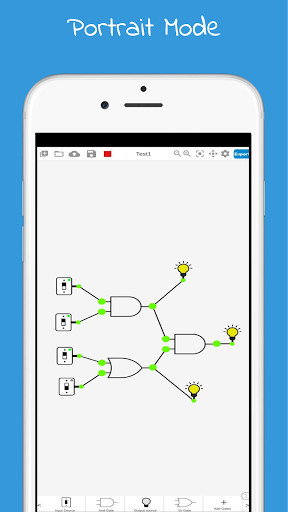
This application a helpful tool for engineers, Use different logic gates to build your own logic schemes, Simulate your logic circuit, and save your Digital Circuit locally or on our clouds for free.Also, you can export your project to friends & students.
It's easy to use, You can add logic gates to your worksheet with one click.
With Many logic gates & digital electronics, you have all that it requires to convert your idea into real-world.
You can use a logic circuit simulator to simulate logic gates in two modes:
1- Online Circuit Simulator
2- Offline Circuit Simulator
Project Manager Panel: Easy to take control of your logic circuit projects (Save - Delete).
App Features
Create amazing logic circuits with all the provided digital electronics.
Project Manager Panel - Easy to take control of your logic circuit projects (Save - Delete).
Screen Orientation - The worksheet works on two modes Portrait & Landscape.
Great tablet support - This App works perfectly on different tablets.
Easy control of worksheet & wires matching.
(Drag To Match)
Easy to insert or delete any logic gate.
Cloud Service - you can save & sync unlimited projects to your account.
Locally Save - you can save unlimited projects to your android device.
A variety of elements to use, evolve experiment, and learn.
Project Export - you can export schemes of the digital circuits.
Offline Mode - This app works when you are online or offline.
Customized Worksheet - you can also customize your worksheet color(keep eyes safe), And enable or disable grid.
Easy to reposition any logic gate on the worksheet.(Drag To Reposition)
Smooth & Stable.
Nice UI Design.
Change input sources value at runtime.
How To Use
This App is easy to use :
Start Project by set name & press new.
Select logic gate and click on a worksheet to add.
Match wires by drag (input-output) or (output-input).
Delete any logic gate by double click to enable delete UI.
Reposition an element by dragging.
Simulate with one click on (Run Button).
Logic Gates & Elements
AND GATE
OR GATE
NOT GATE / INVERTER GATE
NAND GATE
NOR GATE
XOR GATE
XNOR GATE
Led Output
Switch
Single Input Source
7 Segment Display
Pulse Generator 1 Hz
NOTE
This App is all free, Download now!
SUPPORT
For tech support or suggestions please email the app developer :
[email protected]
This application a helpful tool for engineers, Use different logic gates to build your own logic schemes, Simulate your logic circuit, and save your Digital Circuit locally or on our clouds for free.Also, you can export your project to friends & students.
It's easy to use, You can add logic gates to your worksheet with one click.
With Many logic gates & digital electronics, you have all that it requires to convert your idea into real-world.
You can use a logic circuit simulator to simulate logic gates in two modes:
1- Online Circuit Simulator
2- Offline Circuit Simulator
Project Manager Panel: Easy to take control of your logic circuit projects (Save - Delete).
App Features
Create amazing logic circuits with all the provided digital electronics.
Project Manager Panel - Easy to take control of your logic circuit projects (Save - Delete).
Screen Orientation - The worksheet works on two modes Portrait & Landscape.
Great tablet support - This App works perfectly on different tablets.
Easy control of worksheet & wires matching.
(Drag To Match)
Easy to insert or delete any logic gate.
Cloud Service - you can save & sync unlimited projects to your account.
Locally Save - you can save unlimited projects to your android device.
A variety of elements to use, evolve experiment, and learn.
Project Export - you can export schemes of the digital circuits.
Offline Mode - This app works when you are online or offline.
Customized Worksheet - you can also customize your worksheet color(keep eyes safe), And enable or disable grid.
Easy to reposition any logic gate on the worksheet.(Drag To Reposition)
Smooth & Stable.
Nice UI Design.
Change input sources value at runtime.
How To Use
This App is easy to use :
Start Project by set name & press new.
Select logic gate and click on a worksheet to add.
Match wires by drag (input-output) or (output-input).
Delete any logic gate by double click to enable delete UI.
Reposition an element by dragging.
Simulate with one click on (Run Button).
Logic Gates & Elements
AND GATE
OR GATE
NOT GATE / INVERTER GATE
NAND GATE
NOR GATE
XOR GATE
XNOR GATE
Led Output
Switch
Single Input Source
7 Segment Display
Pulse Generator 1 Hz
NOTE
This App is all free, Download now!
SUPPORT
For tech support or suggestions please email the app developer :
[email protected]
MyAndroid is not a downloader online for Portable Logic Lab : Circuit Simulator. It only allows to test online Portable Logic Lab : Circuit Simulator with apkid com.waslastudio.llllitelogiclabandroid. MyAndroid provides the official Google Play Store to run Portable Logic Lab : Circuit Simulator online.
