
We provide Finding Letter online (apkid: com.vinz.findingletter) in order to run this application in our online Android emulator.
Description:
Run this app named Finding Letter using MyAndroid.
You can do it using our Android online emulator.
This is the simple game for Kids who are learning English Upper letters.
How to play:
1.
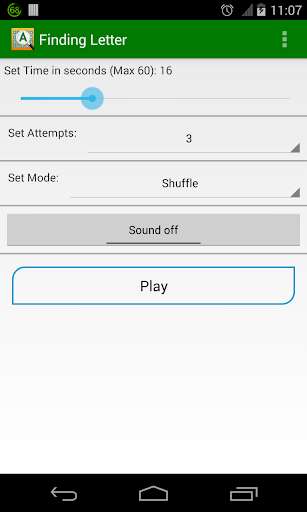
Set the configurations and hit the 'Play' button.
2.
Find the letter shown at the top.
3.
Touch the correct word within the time and attempts you have.
4.
Touch the 'Replay' icon to play again with the same configuration or go back and set different configuration and hit 'Play' button.
Features:
Initial version 1.0:
- Shuffle/Normal mode: In Shuffle mode, the letters are shuffled every time here-and-there.
In Normal mode, letters are in alphabetical order.
- Set timer: Min 5 seconds, Max 60 seconds
- Set Maximum attempts: 1, 3, 5, 7
- Sound: on/off
Please give us reviews/rates.
Mail us at [email protected] for suggestions/feedback.
How to play:
1.
Set the configurations and hit the 'Play' button.
2.
Find the letter shown at the top.
3.
Touch the correct word within the time and attempts you have.
4.
Touch the 'Replay' icon to play again with the same configuration or go back and set different configuration and hit 'Play' button.
Features:
Initial version 1.0:
- Shuffle/Normal mode: In Shuffle mode, the letters are shuffled every time here-and-there.
In Normal mode, letters are in alphabetical order.
- Set timer: Min 5 seconds, Max 60 seconds
- Set Maximum attempts: 1, 3, 5, 7
- Sound: on/off
Please give us reviews/rates.
Mail us at [email protected] for suggestions/feedback.
MyAndroid is not a downloader online for Finding Letter. It only allows to test online Finding Letter with apkid com.vinz.findingletter. MyAndroid provides the official Google Play Store to run Finding Letter online.
