
We provide VM Driller Display online (apkid: com.vectormagnetics.android.drillerdisplay) in order to run this application in our online Android emulator.
Description:
Run this app named VM Driller Display using MyAndroid.
You can do it using our Android online emulator.
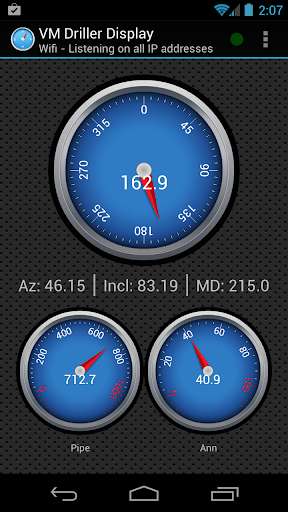
VM Driller Display is a Horizontal Directional Drilling (HDD) tool that monitors crucial drilling information, such as the magnetic probe tool face angle, in real time.
It is ONLY COMPATIBLE with RivCross, the HDD software suite released by Vector Magnetics.
This app can display the following data from RivCross:
-\tMagnetic probe tool face angle
-\tAzimuth
-\tInclination
-\tMeasured depth
-\tPipe pressure
-\tAnnular pressure
-\tWeight on bit (RivCross 4 only)
-\tRPMs
It also includes the following features:
-\tSupport for connecting to RivCross via either Bluetooth or Wi-Fi
-\tCustomized gauge selection
-\tCustomized pressure and weight on bit gauge ranges
-\tAutomatic warnings if pressure/weight on bit readings are too high or low
-\tNotifications when shots are taken in RivCross
-\tNotifications when messages are sent from RivCross
-\tAbility to send messages to RivCross (RivCross 4 only)
-\tAbility to take ParaTrack2 shots in RivCross (RivCross 4 only)
For more information, please download the user's guide from:
http: //vectormagnetics.com/support/hdd/documentation (after login) as "Android Driller Display App User Guide V1.5"
The Bridge program (required for Bluetooth in RivCross 3.2.8) is available at:
http: //vectormagnetics.com/support/rivcross3 (after login) as "Bluetooth Bridge for use with Android App".
Permissions:
Internet Open network sockets
Bluetooth Connect to paired Bluetooth devices
Access Wi-Fi State Access information about Wi-Fi networks
Change Wi-Fi State Change WiFi connectivity state
EULA:
http: //vectormagnetics.com/support/hdd/documentation (after login) as "VM Driller Display End User License Agreement.txt"
Privacy: we respect your privacy!
It is ONLY COMPATIBLE with RivCross, the HDD software suite released by Vector Magnetics.
This app can display the following data from RivCross:
-\tMagnetic probe tool face angle
-\tAzimuth
-\tInclination
-\tMeasured depth
-\tPipe pressure
-\tAnnular pressure
-\tWeight on bit (RivCross 4 only)
-\tRPMs
It also includes the following features:
-\tSupport for connecting to RivCross via either Bluetooth or Wi-Fi
-\tCustomized gauge selection
-\tCustomized pressure and weight on bit gauge ranges
-\tAutomatic warnings if pressure/weight on bit readings are too high or low
-\tNotifications when shots are taken in RivCross
-\tNotifications when messages are sent from RivCross
-\tAbility to send messages to RivCross (RivCross 4 only)
-\tAbility to take ParaTrack2 shots in RivCross (RivCross 4 only)
For more information, please download the user's guide from:
http: //vectormagnetics.com/support/hdd/documentation (after login) as "Android Driller Display App User Guide V1.5"
The Bridge program (required for Bluetooth in RivCross 3.2.8) is available at:
http: //vectormagnetics.com/support/rivcross3 (after login) as "Bluetooth Bridge for use with Android App".
Permissions:
Internet Open network sockets
Bluetooth Connect to paired Bluetooth devices
Access Wi-Fi State Access information about Wi-Fi networks
Change Wi-Fi State Change WiFi connectivity state
EULA:
http: //vectormagnetics.com/support/hdd/documentation (after login) as "VM Driller Display End User License Agreement.txt"
Privacy: we respect your privacy!
MyAndroid is not a downloader online for VM Driller Display. It only allows to test online VM Driller Display with apkid com.vectormagnetics.android.drillerdisplay. MyAndroid provides the official Google Play Store to run VM Driller Display online.
