
We provide Uni Specs - Custom Mobile Cover & T-shirt Designer online (apkid: com.unispecs) in order to run this application in our online Android emulator.
Description:
Run this app named Uni Specs - Custom Mobile Cover & T-shirt Designer using MyAndroid.
You can do it using our Android online emulator.
Build Your Own Customize Product & Get Into A Wholesale Price.
100% Premium Quality Products At Your Doorstep, There Are Many Features Available For Designing The Product,
FEATURES OF THIS APP : -
Upload Your Image & Adjust In Product Easily
Add Unlimited Text
Add Pre-Made Designs
Tutorial - How To Design
Easy Checkout Process
Quick Delivery
HOW TO DESIGN/DECORATE YOUR PRODUCT
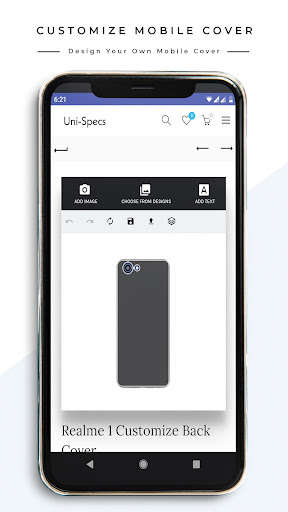
The back cover is fully customized as your need.
You can add images, stickers & custom text in the cover.
However, We also offer some readymade designs, which helps to make a back cover more attractive.
Text Tool : -
Some basic features included in text tools such as text sizing, coloring, alignment, font style changing, etc.
In Mobile Case Design You can also make text bold, italic & underline as per your need.
some special features involved such as text radius changing, text justification & spacing, etc.
with the Help of this Tool you can make any T-shirt Design
Adding Image tools : -
There are several options for adding images, you can upload your image from mobile phone/desktop or choose a high-quality image from pixabay, all the images in pixabay are fully royalty-free, In addition you can freely use the images without any restriction.
4 dots are there for scaling the image from all sides, Easily design your T-Shirt.
Readymade Designs : -
You can add any pre-made designs to mobile case & personalize product your according to choice, we will add more custom-made designs in design tool later
Layers : -
Layer plays a very important role in designing work with the help of layers you can lock, remove, or drag any object behind or above of mobile cover.
You have a better knowledge of the layer tool if you have used a photoshop for editing images.
Miscellaneous tools : -
There are many basic tools that help you to customize your T-Shirt, Tools involved (undo, redo, reset, save, upload).
The saving function does not save your design to the file manager or your phone gallery.
It saves on a unispecs.in server & you can use the saved designs by clicking on the upload icon.
--- SHIPPING ALL OVER INDIA ---
100% Premium Quality Products At Your Doorstep, There Are Many Features Available For Designing The Product,
FEATURES OF THIS APP : -
Upload Your Image & Adjust In Product Easily
Add Unlimited Text
Add Pre-Made Designs
Tutorial - How To Design
Easy Checkout Process
Quick Delivery
HOW TO DESIGN/DECORATE YOUR PRODUCT
The back cover is fully customized as your need.
You can add images, stickers & custom text in the cover.
However, We also offer some readymade designs, which helps to make a back cover more attractive.
Text Tool : -
Some basic features included in text tools such as text sizing, coloring, alignment, font style changing, etc.
In Mobile Case Design You can also make text bold, italic & underline as per your need.
some special features involved such as text radius changing, text justification & spacing, etc.
with the Help of this Tool you can make any T-shirt Design
Adding Image tools : -
There are several options for adding images, you can upload your image from mobile phone/desktop or choose a high-quality image from pixabay, all the images in pixabay are fully royalty-free, In addition you can freely use the images without any restriction.
4 dots are there for scaling the image from all sides, Easily design your T-Shirt.
Readymade Designs : -
You can add any pre-made designs to mobile case & personalize product your according to choice, we will add more custom-made designs in design tool later
Layers : -
Layer plays a very important role in designing work with the help of layers you can lock, remove, or drag any object behind or above of mobile cover.
You have a better knowledge of the layer tool if you have used a photoshop for editing images.
Miscellaneous tools : -
There are many basic tools that help you to customize your T-Shirt, Tools involved (undo, redo, reset, save, upload).
The saving function does not save your design to the file manager or your phone gallery.
It saves on a unispecs.in server & you can use the saved designs by clicking on the upload icon.
--- SHIPPING ALL OVER INDIA ---
MyAndroid is not a downloader online for Uni Specs - Custom Mobile Cover & T-shirt Designer. It only allows to test online Uni Specs - Custom Mobile Cover & T-shirt Designer with apkid com.unispecs. MyAndroid provides the official Google Play Store to run Uni Specs - Custom Mobile Cover & T-shirt Designer online.
