
We provide USB Sharp Pro - File Sharing online (apkid: com.ujweng.usbsharppro) in order to run this application in our online Android emulator.
Description:
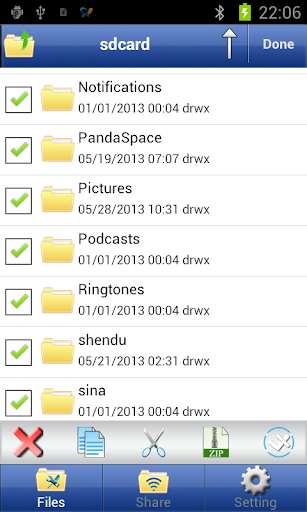
Run this app named USB Sharp Pro - File Sharing using MyAndroid.
You can do it using our Android online emulator.
USB Sharp Let your phone into a high-capacity, portable wireless U disk, convenient, and efficient management of your files!
If you have a long-term or frequent data cable with plug SD card troubles, then please use the USB Sharp, USB Sharp can
Allow you to eliminate more trouble!
Note:
* Mobile phones and computers sharing a wireless router must be the same
* Only in Share UI through a browser interface to shared files
* When you open the background sharing options, we recommended to set a password.
Has the following features:
**** Convenient and efficient file sharing
* Support WIFI file sharing (can achieve upload, download, delete, create folder manipulation)
* Support for file and folder sharing (via email, Bluetooth)
**** Convenient, efficient management documents
* Support for file and folder sorting (by name, time, size, file type)
* Support for editing files and folders (available to copy, cut, delete, rename, compress (zip), unzip (zip) operation)
* Support Select All and Deselect All operations;
* Support for audio and video, built-in player
**** Convenient and efficient text editing
* Support for text copy, cut, paste, replace
* Support for external files to copy and paste text
* Automatically select encoding text documents
*** New Text File (default encoding is UTF-8), pictures (by the camera) and folders
*** Support for Simplified Chinese, English
**** Off device for the root
* Support to obtain root privileges (to modify file and folder permissions to read and write)
USB Sharp Supported file formats:
Plain text: .
Txt
Image: .
Png.
Jpg.
Jpeg.
Gif
Video: .
Mp4.
Mov.
M4v .3gp
Audio: .
Mp3.
M4a.
Aac
Web: .
Htm.
Html.
Xhtml
Compression: .
Zip
If you have a long-term or frequent data cable with plug SD card troubles, then please use the USB Sharp, USB Sharp can
Allow you to eliminate more trouble!
Note:
* Mobile phones and computers sharing a wireless router must be the same
* Only in Share UI through a browser interface to shared files
* When you open the background sharing options, we recommended to set a password.
Has the following features:
**** Convenient and efficient file sharing
* Support WIFI file sharing (can achieve upload, download, delete, create folder manipulation)
* Support for file and folder sharing (via email, Bluetooth)
**** Convenient, efficient management documents
* Support for file and folder sorting (by name, time, size, file type)
* Support for editing files and folders (available to copy, cut, delete, rename, compress (zip), unzip (zip) operation)
* Support Select All and Deselect All operations;
* Support for audio and video, built-in player
**** Convenient and efficient text editing
* Support for text copy, cut, paste, replace
* Support for external files to copy and paste text
* Automatically select encoding text documents
*** New Text File (default encoding is UTF-8), pictures (by the camera) and folders
*** Support for Simplified Chinese, English
**** Off device for the root
* Support to obtain root privileges (to modify file and folder permissions to read and write)
USB Sharp Supported file formats:
Plain text: .
Txt
Image: .
Png.
Jpg.
Jpeg.
Gif
Video: .
Mp4.
Mov.
M4v .3gp
Audio: .
Mp3.
M4a.
Aac
Web: .
Htm.
Html.
Xhtml
Compression: .
Zip
MyAndroid is not a downloader online for USB Sharp Pro - File Sharing. It only allows to test online USB Sharp Pro - File Sharing with apkid com.ujweng.usbsharppro. MyAndroid provides the official Google Play Store to run USB Sharp Pro - File Sharing online.
