

We provide Loop Player online (apkid: com.toth.loopplayer) in order to run this application in our online Android emulator.
Description:
Run this app named Loop Player using MyAndroid.
You can do it using our Android online emulator.
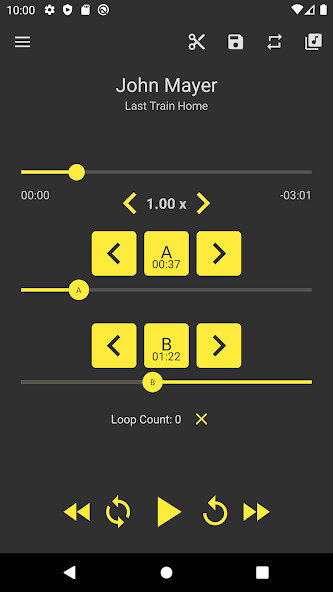
Loop Player is an A - B repeating player (repeating user defined part of audio between A and B points) with advanced controls and playback speed support.
This repeat media player app is very useful to study new languages, practice music, dance or tai-chi trainees or listen to eBooks.
Loop Player was originally designed for learning guitar but you can also use it for practicing any musical instrument, listen audio books, learn courses and many more.
You can use it the practice the difficult parts of a song and with the build in "playback speed" controller you can adjust the playback speed to your current playing level.
The application is very simple to use.
First you load a song from your personal audio library and then you basically have two controls "A" and "B".
These are used to set the starting and ending point of your loop.
Also you have additional controls to fine-tune the starting and ending points and to control the playback speed of your audio file.
Free version features
Playing audio
Repeat interval or looping
Change playback speed
File browsing
Count loop repetition and set maximum number of repetition.
Background audio
PRO version features
You can unlock PRO version via purchase:
Support for more file types.
Support playback speeds from 0.3x to 1.7x.
Save unlimited number of loops.
Export loop as separate audio file.
Multiple themes.
If you like this app, please take some time and review it : ).
Contact us:
Email: [email protected]
Permissions:
Billing: Used to unlock PRO version.
External Storage: Used to load audio files in this application.
This repeat media player app is very useful to study new languages, practice music, dance or tai-chi trainees or listen to eBooks.
Loop Player was originally designed for learning guitar but you can also use it for practicing any musical instrument, listen audio books, learn courses and many more.
You can use it the practice the difficult parts of a song and with the build in "playback speed" controller you can adjust the playback speed to your current playing level.
The application is very simple to use.
First you load a song from your personal audio library and then you basically have two controls "A" and "B".
These are used to set the starting and ending point of your loop.
Also you have additional controls to fine-tune the starting and ending points and to control the playback speed of your audio file.
Free version features
Playing audio
Repeat interval or looping
Change playback speed
File browsing
Count loop repetition and set maximum number of repetition.
Background audio
PRO version features
You can unlock PRO version via purchase:
Support for more file types.
Support playback speeds from 0.3x to 1.7x.
Save unlimited number of loops.
Export loop as separate audio file.
Multiple themes.
If you like this app, please take some time and review it : ).
Contact us:
Email: [email protected]
Permissions:
Billing: Used to unlock PRO version.
External Storage: Used to load audio files in this application.
MyAndroid is not a downloader online for Loop Player. It only allows to test online Loop Player with apkid com.toth.loopplayer. MyAndroid provides the official Google Play Store to run Loop Player online.
