
We provide Time Warp Scan - Freeze Filter online (apkid: com.time.warpscan) in order to run this application in our online Android emulator.
Description:
Run this app named Time Warp Scan - Freeze Filter using MyAndroid.
You can do it using our Android online emulator.
FREEZE SCAN allow you to take incredible photo and Video with TikTok like effect.
This is a filter for videos and images that is extremely popular with young people recently.
With time warp, you can create unique faces, funny looks, and create interesting photos.
The warp scan effect is one of the most popular and viral challenges on social media.
Now you can use this trendy face warp filter for free with Time warp effect.
How does it work?
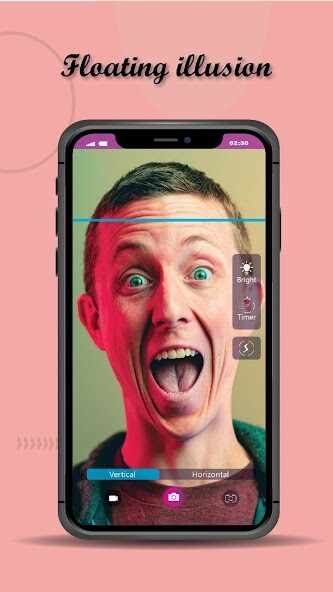
Time Warp Scan filter, also known as "Blue line filter," works by freezing the image on the screen incrementally as a blue line moves down, or across the screen.
The common use of the Time Warp Scan Filter:
Smoking illusion
Uses the Time Warp Scan effect to create an image of exaggerated smoking.
Mirror double
Creates a mirror double that doesn't match the image of the person themselves.
Thin and wavey eyebrows
Using the effect to make it appear as if they have thin eyebrows.
Effect fails
Just posting the failed uses of Time Warp Scan.
Features:
- choose between taking pictures or videos,
- choose scan direction by swiping right or down,
- save pictures and videos,
- share your TIME WARP SCAN's with your friends via TikTok, Snapchat, Facebook Messenger, WhatsApp, Instagram, Likee, and many other apps.
This is a filter for videos and images that is extremely popular with young people recently.
With time warp, you can create unique faces, funny looks, and create interesting photos.
The warp scan effect is one of the most popular and viral challenges on social media.
Now you can use this trendy face warp filter for free with Time warp effect.
How does it work?
Time Warp Scan filter, also known as "Blue line filter," works by freezing the image on the screen incrementally as a blue line moves down, or across the screen.
The common use of the Time Warp Scan Filter:
Smoking illusion
Uses the Time Warp Scan effect to create an image of exaggerated smoking.
Mirror double
Creates a mirror double that doesn't match the image of the person themselves.
Thin and wavey eyebrows
Using the effect to make it appear as if they have thin eyebrows.
Effect fails
Just posting the failed uses of Time Warp Scan.
Features:
- choose between taking pictures or videos,
- choose scan direction by swiping right or down,
- save pictures and videos,
- share your TIME WARP SCAN's with your friends via TikTok, Snapchat, Facebook Messenger, WhatsApp, Instagram, Likee, and many other apps.
MyAndroid is not a downloader online for Time Warp Scan - Freeze Filter. It only allows to test online Time Warp Scan - Freeze Filter with apkid com.time.warpscan. MyAndroid provides the official Google Play Store to run Time Warp Scan - Freeze Filter online.
