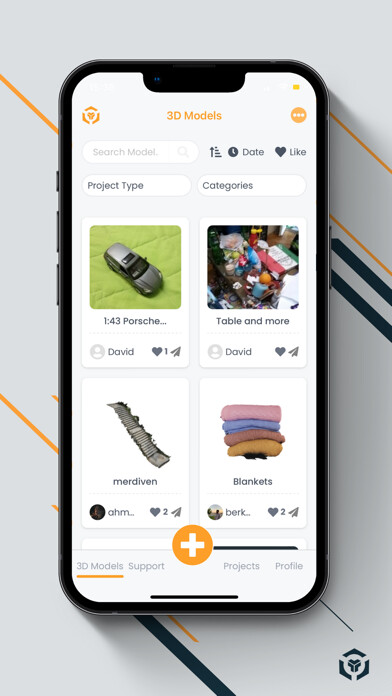
We provide 3D ProBox: 3D Scanner online (apkid: com.threedprobox.threedprobox) in order to run this application in our online Android emulator.
Description:
Run this app named 3D ProBox: 3D Scanner using MyAndroid.
You can do it using our Android online emulator.
What is the 3D ProBox?
3D ProBox is a platform where you can produce
3D models by making
3D scans with high image quality without the need for an extra mechanism or feature.
What Can You Do With 3D Probox Application?
3D scan with mobile phones, cameras and drones.
Take and upload photos around the object.
Produce high image quality 3D models.
Perform high-accuracy 3D scanning.
Use minimum 20, maximum 2,000 photos.
You can also do the same operations from the 3D ProBox website.
Share your 3D Models:
Publish your 3D models public or private.
Share on different websites with embed code.
Interact with users in the 3D ProBox community.
Download your 3D Models:
Download your 3D models in ".glb .gltf and .obj" formats.
Download texture files in .jpeg format.
In which sectors are 3D models made with 3D ProBox used
E-commerce
Art
Human
Fashion & Style
Building and Decoration
Furniture & Home
Graphic design
Game Developers
Characters
Real estate
Archeology
Cars & Vehicles
Places & Travel
Science & Technology
Movie & Cinema
NFT
You can 3D scanning all objects except bright, transparent and non-detailed ones.
Free 3D Scanning with 3D ProBox!
Do a Free 3D Scan with Gift Credits to be uploaded to your profile.
Process steps:
Take photos
Upload
Processed
Edit
Publish
Share
Download
NOTE:
Production of high quality 3D modelstakes time.
This time interval differs according to the number of photographs used.
The objects that you want to 3D scan in should not be transparent, bright and undetailed.
Besides, the objects should not move.
Once you start shooting, keep shooting without losing the context.
Take photos with an overlay.
If you want to increase the image quality, use better devices with higher pixel quality.
Take photos at normal speed.
Do not keep the overlay ratios low between two consecutive photos.
Shoot from all surfaces of the object that you want to be 3D scanned.
Follow us at the following addresses:
www.3dprobox.com
www.instagram.com/3dprobox
www.tiktok.com/@3dprobox
www.youtube.com/c/3DProBox
MyAndroid is not a downloader online for 3D ProBox: 3D Scanner. It only allows to test online 3D ProBox: 3D Scanner with apkid com.threedprobox.threedprobox. MyAndroid provides the official Google Play Store to run 3D ProBox: 3D Scanner online.