
We provide Tensor SSM online (apkid: com.tensor.tensorssm380) in order to run this application in our online Android emulator.
Description:
Run this app named Tensor SSM using MyAndroid.
You can do it using our Android online emulator.
Important Note: this app is compatible with 3.8.0.x+ versions of Tensor SSM.
Some newer features are available when used in conjuction with later versions of Tensor SSM that support them.
The Tensor Mobile Self Service Module (SSM) is the perfect addition to your Tensor.NET Time & Attendance system.
Using the Mobile SSM on your Android smart phone, you can:
Clock IN or OUT and book ON or OFF jobs (with options for GPS tagging)
Clock OUT with using a reason code
View previous clockings, add missing clockings or amend existing ones
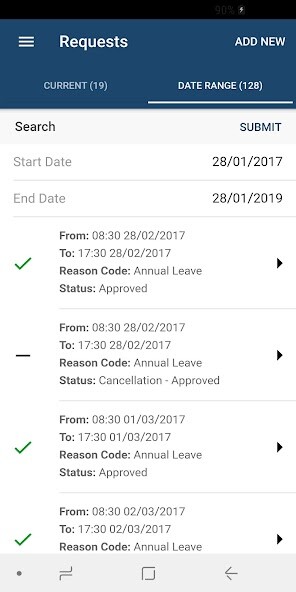
Request & cancel a period of absence/holiday
Receive a notification when absence requests are authorised or denied
View the status of your absence requests and clocking amendments
View your current & remaining holiday entitlement
View you absence planner for any year
View your current flexitime balance, flexitime history and request adjustments to your flexi balance
Supervisors managing employees can :
Authorise or deny any requested periods of absence made by their subordinate work colleagues
Authorise or deny any requested absence cancellations
Authorise or deny any requested clocking amendments
Authorise or deny any requested flexitime adjustments
Receive notifications when subordinate work colleagues request periods of absence or clocking amendments
View the current status and clocking times of their subordinate work colleagues
View a consolidated absence planner containing absence details of all their subordinate work colleagues
Mobile clockings and job bookings, once submitted, are transferred to the central Tensor.NET application with GPS position data to ascertain the mobile devices location at the time of clocking.
Employee movements can then be displayed & plotted on a map viewable in Tensor.NET.
The Tensor Mobile SSM implements role based security allowing you to easily choose which combination of features employees will have access to.
Disabled features, such as the ability to view flexitime, will simply not appear at all.
The application adapts to a sudden loss of connectivity by caching offline requests on your mobile device.
Once a network connection is restored, any cached information is transferred immediately.
Some newer features are available when used in conjuction with later versions of Tensor SSM that support them.
The Tensor Mobile Self Service Module (SSM) is the perfect addition to your Tensor.NET Time & Attendance system.
Using the Mobile SSM on your Android smart phone, you can:
Clock IN or OUT and book ON or OFF jobs (with options for GPS tagging)
Clock OUT with using a reason code
View previous clockings, add missing clockings or amend existing ones
Request & cancel a period of absence/holiday
Receive a notification when absence requests are authorised or denied
View the status of your absence requests and clocking amendments
View your current & remaining holiday entitlement
View you absence planner for any year
View your current flexitime balance, flexitime history and request adjustments to your flexi balance
Supervisors managing employees can :
Authorise or deny any requested periods of absence made by their subordinate work colleagues
Authorise or deny any requested absence cancellations
Authorise or deny any requested clocking amendments
Authorise or deny any requested flexitime adjustments
Receive notifications when subordinate work colleagues request periods of absence or clocking amendments
View the current status and clocking times of their subordinate work colleagues
View a consolidated absence planner containing absence details of all their subordinate work colleagues
Mobile clockings and job bookings, once submitted, are transferred to the central Tensor.NET application with GPS position data to ascertain the mobile devices location at the time of clocking.
Employee movements can then be displayed & plotted on a map viewable in Tensor.NET.
The Tensor Mobile SSM implements role based security allowing you to easily choose which combination of features employees will have access to.
Disabled features, such as the ability to view flexitime, will simply not appear at all.
The application adapts to a sudden loss of connectivity by caching offline requests on your mobile device.
Once a network connection is restored, any cached information is transferred immediately.
MyAndroid is not a downloader online for Tensor SSM. It only allows to test online Tensor SSM with apkid com.tensor.tensorssm380. MyAndroid provides the official Google Play Store to run Tensor SSM online.
