

We provide PING Game - Anti Lag Legends Gaming Online online (apkid: com.teknokia.pingergame) in order to run this application in our online Android emulator.
Description:
Run this app named PING Game - Anti Lag Legends Gaming Online using MyAndroid.
You can do it using our Android online emulator.
Pinger Game Tools for Gamer in playing Mobile games legends Online its now available.
It is very lightweight when playing online games like Battle Royale Multiplayer and Multiplayer Online Battle Arena (MOBA)
It can also be used as Ping Booster for playing games on PC if you Install it on an android device and activate Tethering Wireless Hotspot.
How to use it ? :
1.
Run This App
2.
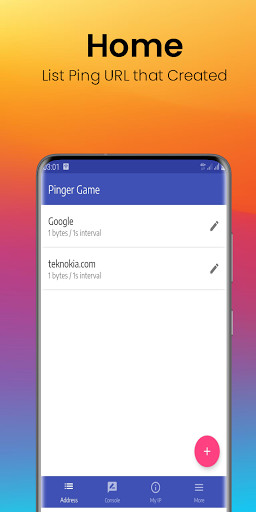
Tap Fab Icon + to Create new network Ping URL.
you must fill in the entries below: highly recommends:
- Entry URL : teknokia.com or google.com (recommend using link with local server.
you are free to fill in any link).
- Display Name : Fill Any name (If its blank doesn't matter)
- Packet Size : 1
- Ping count : Keep Blank for unlimited ping
- Ping Interval : 1 (second).
Tap OK.
3.
Choose the Network Ping URL that has been created at no 2 above.
4.
Tap Start for Starting Ping process.
If there is an unstable signal effect, you can lock the LTE Only network with the Force 4G LTE Only 2020 application that we have built.
It is very lightweight when playing online games like Battle Royale Multiplayer and Multiplayer Online Battle Arena (MOBA)
It can also be used as Ping Booster for playing games on PC if you Install it on an android device and activate Tethering Wireless Hotspot.
How to use it ? :
1.
Run This App
2.
Tap Fab Icon + to Create new network Ping URL.
you must fill in the entries below: highly recommends:
- Entry URL : teknokia.com or google.com (recommend using link with local server.
you are free to fill in any link).
- Display Name : Fill Any name (If its blank doesn't matter)
- Packet Size : 1
- Ping count : Keep Blank for unlimited ping
- Ping Interval : 1 (second).
Tap OK.
3.
Choose the Network Ping URL that has been created at no 2 above.
4.
Tap Start for Starting Ping process.
If there is an unstable signal effect, you can lock the LTE Only network with the Force 4G LTE Only 2020 application that we have built.
MyAndroid is not a downloader online for PING Game - Anti Lag Legends Gaming Online. It only allows to test online PING Game - Anti Lag Legends Gaming Online with apkid com.teknokia.pingergame. MyAndroid provides the official Google Play Store to run PING Game - Anti Lag Legends Gaming Online online.
