
We provide Time9 Tabata Interval Timer online (apkid: com.tantansoft.time91) in order to run this application in our online Android emulator.
Description:
Run this app named Time9 Tabata Interval Timer using MyAndroid.
You can do it using our Android online emulator.
Tabata interval timer .
.
new , , , ,
.
.
.^^
)
** ()
1.
New :
2.
Init :
3.
:
4.
:
** ( )
1.
Start :
2.
Pause :
3.
Stop :
4.
List :
** ( )
1.
, , , ,
2.
Save :
3.
Cancel :
4.
Delete :
=================================================
It is similar to interval timer app with the Tabata interval timer.
First use new button to the job name, preparation time, working time, rest time, enter a finishing time
When you save a task list appears on the home screen.
Clicking the job name in the task list to the timer display.
Even better if you use interval training.
^^
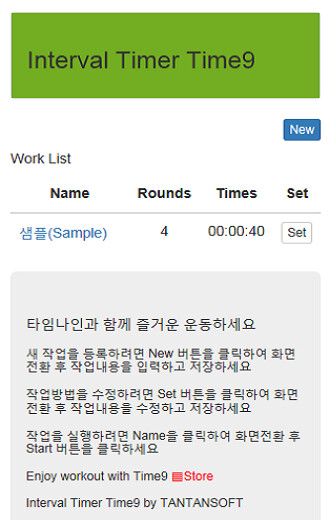
How to use)
** Home screen (list display)
1.
New: a new registration work
2.
Init: Initialize task list
3.
Click Job Name: User Details interval timer
4.
Click Settings: Modify Job Information
** Detailed information (interval timer)
1.
Start: Start
2.
Pause: Pause
3.
Stop: Stop
4.
List: Go List
** Registration screen (task registration and modification)
1.
working people, preparation time, working time, rest time, if the input deadline
2.
Save: store job information
3.
Cancel: Go List
4.
Delete: Delete the job information
----
:
01090977389
.
new , , , ,
.
.
.^^
)
** ()
1.
New :
2.
Init :
3.
:
4.
:
** ( )
1.
Start :
2.
Pause :
3.
Stop :
4.
List :
** ( )
1.
, , , ,
2.
Save :
3.
Cancel :
4.
Delete :
=================================================
It is similar to interval timer app with the Tabata interval timer.
First use new button to the job name, preparation time, working time, rest time, enter a finishing time
When you save a task list appears on the home screen.
Clicking the job name in the task list to the timer display.
Even better if you use interval training.
^^
How to use)
** Home screen (list display)
1.
New: a new registration work
2.
Init: Initialize task list
3.
Click Job Name: User Details interval timer
4.
Click Settings: Modify Job Information
** Detailed information (interval timer)
1.
Start: Start
2.
Pause: Pause
3.
Stop: Stop
4.
List: Go List
** Registration screen (task registration and modification)
1.
working people, preparation time, working time, rest time, if the input deadline
2.
Save: store job information
3.
Cancel: Go List
4.
Delete: Delete the job information
----
:
01090977389
MyAndroid is not a downloader online for Time9 Tabata Interval Timer. It only allows to test online Time9 Tabata Interval Timer with apkid com.tantansoft.time91. MyAndroid provides the official Google Play Store to run Time9 Tabata Interval Timer online.
