

We provide SwyxMobile online (apkid: com.swyx.mobile2019) in order to run this application in our online Android emulator.
Description:
Run this app named SwyxMobile using MyAndroid.
You can do it using our Android online emulator.
With SwyxMobile all business calls are telephoneasy.
You can seamlessly embed and simply integrate your Android smartphones into your corporate communication with an innovative user interface concept allowing ease of use for all communication functions.
HIGHLIGHTS
modern and innovative user interface concept allows intuitive handling of all communication features and functions
brilliant audio quality with High-Definition (HD) voice calls
easy-to-use management presence state and call forwarding optimises availability within the company
SYSTEM REQUIREMENTS
For the Swyx Mobile for Android client to operate, the following requirements need to be fulfilled:
Server: SwyxWare 11/ NetPhone 11 (or later) with Push Notification Server 1.0.7 (or later)
Network: Router with enabled 802.11r (FastRoaming)
Client: Smartphone with Android 6 (or later), 64-bit Processor and 802.11r (FastRoaming)
Recommendation:
Please ensure that 'Data Saver' is switched off at Android Settings > Data Usage
Note:
To ensure best user experience, we recommend the use of latest mid to high end Android business smartphones with at least a 2.2 GHz quad-core processor, at least 4 GB of RAM and a minimum resolution of 1.280 x 720 Pixel.
A TALENT FOR COMMUNICATION
Communicate in HD audio quality
Navigate easily through your contacts, favourites and call journal
Initiate calls conveniently by direct number entry, from phonebook, call lists
FURTHER FEATURE RICH FUNCTIONS:
Call management: transfer, redirect, mute, hold and swap calls, transfer calls to other devices
Call Line Identification (CLI) & "Privacy" functions for external calls
Suppress calling number
Voicemail support
Use different ring tones for incoming calls
Easy configuration
CONTACT, CALL, COORDINATE
Presence Management: manual setting of presence status (incl.
Offline), status message and your profile picture
Filter and search in phonebook contacts with support for profile photos of contacts
(server based business contacts and local personal contacts)
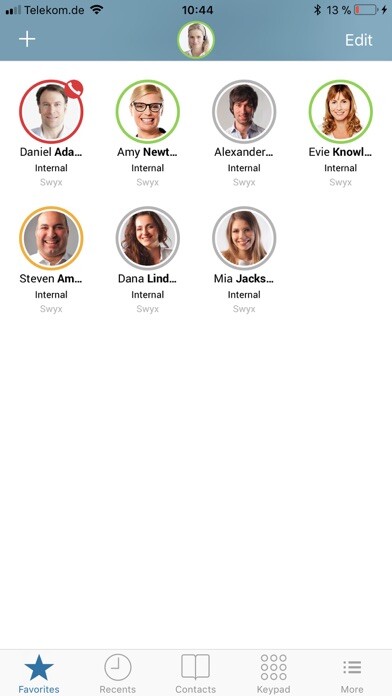
Create favourites for contacts with including participant status
Call logs (for incoming, outgoing and missed calls,)
Conferences: User initiated ad-hoc three-party conferences
Support for simple Call Routing: "Do not disturb", forwarding when busy, forwarding when delayed, forwarding immediate, forwarding when participant logged-off
RESTRICTIONS / KNOWN ISSUES IN THIS VERSION
Some issues with Favourites (presence status updates, vanishing Favourites, Favourites deletion, list view)
Changing networks during an ongoing call causes the call to drop
On Android 9 you need to set up volume for ringtone and speech separately
Bluetooth audio channel is not opened for outgoing calls
Sometimes names are not displayed for incoming external calls
You can seamlessly embed and simply integrate your Android smartphones into your corporate communication with an innovative user interface concept allowing ease of use for all communication functions.
HIGHLIGHTS
modern and innovative user interface concept allows intuitive handling of all communication features and functions
brilliant audio quality with High-Definition (HD) voice calls
easy-to-use management presence state and call forwarding optimises availability within the company
SYSTEM REQUIREMENTS
For the Swyx Mobile for Android client to operate, the following requirements need to be fulfilled:
Server: SwyxWare 11/ NetPhone 11 (or later) with Push Notification Server 1.0.7 (or later)
Network: Router with enabled 802.11r (FastRoaming)
Client: Smartphone with Android 6 (or later), 64-bit Processor and 802.11r (FastRoaming)
Recommendation:
Please ensure that 'Data Saver' is switched off at Android Settings > Data Usage
Note:
To ensure best user experience, we recommend the use of latest mid to high end Android business smartphones with at least a 2.2 GHz quad-core processor, at least 4 GB of RAM and a minimum resolution of 1.280 x 720 Pixel.
A TALENT FOR COMMUNICATION
Communicate in HD audio quality
Navigate easily through your contacts, favourites and call journal
Initiate calls conveniently by direct number entry, from phonebook, call lists
FURTHER FEATURE RICH FUNCTIONS:
Call management: transfer, redirect, mute, hold and swap calls, transfer calls to other devices
Call Line Identification (CLI) & "Privacy" functions for external calls
Suppress calling number
Voicemail support
Use different ring tones for incoming calls
Easy configuration
CONTACT, CALL, COORDINATE
Presence Management: manual setting of presence status (incl.
Offline), status message and your profile picture
Filter and search in phonebook contacts with support for profile photos of contacts
(server based business contacts and local personal contacts)
Create favourites for contacts with including participant status
Call logs (for incoming, outgoing and missed calls,)
Conferences: User initiated ad-hoc three-party conferences
Support for simple Call Routing: "Do not disturb", forwarding when busy, forwarding when delayed, forwarding immediate, forwarding when participant logged-off
RESTRICTIONS / KNOWN ISSUES IN THIS VERSION
Some issues with Favourites (presence status updates, vanishing Favourites, Favourites deletion, list view)
Changing networks during an ongoing call causes the call to drop
On Android 9 you need to set up volume for ringtone and speech separately
Bluetooth audio channel is not opened for outgoing calls
Sometimes names are not displayed for incoming external calls
MyAndroid is not a downloader online for SwyxMobile. It only allows to test online SwyxMobile with apkid com.swyx.mobile2019. MyAndroid provides the official Google Play Store to run SwyxMobile online.
