
We provide Whats Web : Status Saver online (apkid: com.statusaver.whatzweb.whats.whatswebscan.whatscan) in order to run this application in our online Android emulator.
Description:
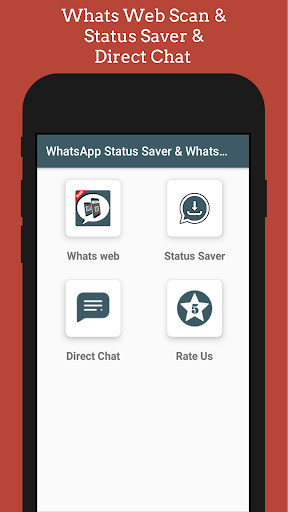
Run this app named Whats Web : Status Saver using MyAndroid.
You can do it using our Android online emulator.
With Whats Web Scan App, you can See anyones WhatsApp Messenger messages to your phone after just scan QR Code of this app
Install the whats web scan app, Open WhatsApp web tab, you find QR Code here.
Scan this code from others WhatsApp Messengers WhatsApp Web option.
New features with this WhatsApp web scan app are as follow:
Status Saver: now to save your friends status is easy from this app.
You can save all status in this app.
Not need to install an extra app for saving status.
Best Quotes and Status: 100+ category latest WhatsApp status.
- Motivational Status
- Attitude status
- Friendship Status
- Sad Status
- Romantic Status
- Mother Day Status
- Birthday Status
- Valentines Status
- New Year Status
- Anniversary Status
What's Web: (not Support in some Mobile)
Follow below mentioned steps for start Easy Scanner with Whats Clone method and use Whats web scan on your device.
1.
Start the Whats Web scan app for clone (whatsapp)on your phone and switch to the tab "Whats Web Scan".
Wait until the QR code appears
2.
Start WhatsApp on other phone
3.
Open the menu on the right in the "Chats" tab on your mobile phone and select the menu item "WhatsApp Web"
4.
Scan the QR code with mobile phone camera
5.
Done
now you will receive all your messages on your phone
Note that, clone WhatsApp will disconnect if phones user logout from their device, because in main device, notification always appear on notification panel, while you connect WhatsApp from this method.
This whats clone is best what scan app under whatz web 2018 category and even most popular in 2019.
Install this app and have fun to see anyones Whatsapp data.
open two account in same device.
Whats Web features
Whats Web: Open two account in same device or same account in multiple devices then this app for you.
Use same account in multiple device.
Whats Web is the fastest application that you can open Whatsup chat messenger application on your mobile and Control another account with the same device
Whats web offers a high-quality design and user-friendly interface.
Status Saver: Currently on Whatsup you can only view your friends status (image or video), but if you want to save it for your use there is no option.
Dont worry this app will solve your problem.
Disclaimer: Whats web is created by us, and it not an official WhatsApp application and not associated with WhatsApp Inc.
Install the whats web scan app, Open WhatsApp web tab, you find QR Code here.
Scan this code from others WhatsApp Messengers WhatsApp Web option.
New features with this WhatsApp web scan app are as follow:
Status Saver: now to save your friends status is easy from this app.
You can save all status in this app.
Not need to install an extra app for saving status.
Best Quotes and Status: 100+ category latest WhatsApp status.
- Motivational Status
- Attitude status
- Friendship Status
- Sad Status
- Romantic Status
- Mother Day Status
- Birthday Status
- Valentines Status
- New Year Status
- Anniversary Status
What's Web: (not Support in some Mobile)
Follow below mentioned steps for start Easy Scanner with Whats Clone method and use Whats web scan on your device.
1.
Start the Whats Web scan app for clone (whatsapp)on your phone and switch to the tab "Whats Web Scan".
Wait until the QR code appears
2.
Start WhatsApp on other phone
3.
Open the menu on the right in the "Chats" tab on your mobile phone and select the menu item "WhatsApp Web"
4.
Scan the QR code with mobile phone camera
5.
Done
now you will receive all your messages on your phone
Note that, clone WhatsApp will disconnect if phones user logout from their device, because in main device, notification always appear on notification panel, while you connect WhatsApp from this method.
This whats clone is best what scan app under whatz web 2018 category and even most popular in 2019.
Install this app and have fun to see anyones Whatsapp data.
open two account in same device.
Whats Web features
Whats Web: Open two account in same device or same account in multiple devices then this app for you.
Use same account in multiple device.
Whats Web is the fastest application that you can open Whatsup chat messenger application on your mobile and Control another account with the same device
Whats web offers a high-quality design and user-friendly interface.
Status Saver: Currently on Whatsup you can only view your friends status (image or video), but if you want to save it for your use there is no option.
Dont worry this app will solve your problem.
Disclaimer: Whats web is created by us, and it not an official WhatsApp application and not associated with WhatsApp Inc.
MyAndroid is not a downloader online for Whats Web : Status Saver. It only allows to test online Whats Web : Status Saver with apkid com.statusaver.whatzweb.whats.whatswebscan.whatscan. MyAndroid provides the official Google Play Store to run Whats Web : Status Saver online.
