
We provide Recording Time Calculator online (apkid: com.sony.sel.udrd.recordingtimecalculator) in order to run this application in our online Android emulator.
Description:
Run this app named Recording Time Calculator using MyAndroid.
You can do it using our Android online emulator.
The Recording Time Calculator app is intended for Sony customers who own a DHG-HDD250/500 Digital Video Recorder, and wish to schedule manual recordings.
The DHG-HDD250/500 uses the TV Guide On Screen system, a third-party service provided by the Rovi Corporation.
In 2012 and 2013, the Rovi Corporation will discontinue the broadcast transmission of Guide data from all US locations, and thus, the Guide will no longer be available on the DHG-HDD250/500, and the system time may no longer be accurate.
However, it is still possible to schedule manual recordings even without Guide data.
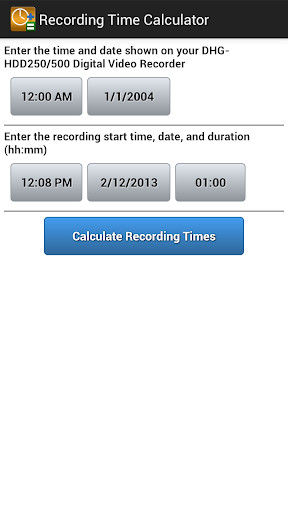
Using the Recording Time Calculator app, you can enter the DHG-HDD250/500s system clock time, and the start/end times of the program you wish to record, and this app will calculate the times to enter into the manual recording menu on the DHG-HDD250/500.
To schedule a manual recording:
\tAccess the manual recording menu on your DHG-HDD250/500, by pressing the REC key on your remote control for 2 seconds.
\tEnter the current system time into the Recording Time Calculator.
\tEnter the start time and duration of the program you wish to record on the Recording Time Calculator.
\tPress the Calculate Times button.
\tThe Recording Time Calculator will use an offset to calculate the values to be entered into the start and end times on the recording menu.
\tEnter these values into the DHG-HDD250/500s recording menu and select the schedule recording button.
The DHG-HDD250/500 uses the TV Guide On Screen system, a third-party service provided by the Rovi Corporation.
In 2012 and 2013, the Rovi Corporation will discontinue the broadcast transmission of Guide data from all US locations, and thus, the Guide will no longer be available on the DHG-HDD250/500, and the system time may no longer be accurate.
However, it is still possible to schedule manual recordings even without Guide data.
Using the Recording Time Calculator app, you can enter the DHG-HDD250/500s system clock time, and the start/end times of the program you wish to record, and this app will calculate the times to enter into the manual recording menu on the DHG-HDD250/500.
To schedule a manual recording:
\tAccess the manual recording menu on your DHG-HDD250/500, by pressing the REC key on your remote control for 2 seconds.
\tEnter the current system time into the Recording Time Calculator.
\tEnter the start time and duration of the program you wish to record on the Recording Time Calculator.
\tPress the Calculate Times button.
\tThe Recording Time Calculator will use an offset to calculate the values to be entered into the start and end times on the recording menu.
\tEnter these values into the DHG-HDD250/500s recording menu and select the schedule recording button.
MyAndroid is not a downloader online for Recording Time Calculator. It only allows to test online Recording Time Calculator with apkid com.sony.sel.udrd.recordingtimecalculator. MyAndroid provides the official Google Play Store to run Recording Time Calculator online.
