
We provide Sweet Notes - Notepad Notebook online (apkid: com.sisomobile.android.notepad) in order to run this application in our online Android emulator.
Description:
Run this app named Sweet Notes - Notepad Notebook using MyAndroid.
You can do it using our Android online emulator.
Notepad with a clean interface allows you to write and search for notes easily and conveniently with just one click.
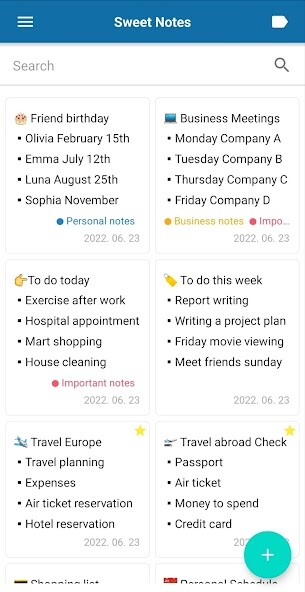
Notes can be easily organized and searched by adding colors and labels, and notes that you must remember can be designated as Interest Notes.
Saved memos can be easily backed up and restored by linking with Google Drive.
Try the Notepad with various functions for free.
1.
Convenient search function
- Instantly search for matching notes in title and content as you enter a search term.
- You can search for notes corresponding to the desired label with one click.
2.
Convenient label function
- Add labels to your notes, making it easy to organize and search.
- You can add labels with any color and name you want.
- Multiple labels can be added to a memo.
- You can add labels various colors.
3.
Various list support
- Supports Display in list format and Display in thumbnail format.
- You can directly select the items to be displayed in the list.
- You can specify the number of lines of text to be displayed in the list.
4.
More convenient sorting function
- You can easy to find the notes of interest by sorting them at the top of the list.
- Supports sorting functions such as title, creation date, modification date.
- Supports sort function in ascending and descending order.
5.
Backup and restore
- Supports backup and recovery through Google Drive.
- Supports deletion function for memo backup data stored in Google Drive.
- When changing devices, you can easily move all the memos to a new phone at once through the backup and recovery function.
6.
Lock settings
- You can manage your notes safely by specifying a password with the lock function.
7.
Secure data management
- The memo data you saved is stored only in your mobile phone, so you can use it safely.
8.
Other convenient functions
- Even if you are not connected to the Internet, you can use the memo function offline.
Notes can be easily organized and searched by adding colors and labels, and notes that you must remember can be designated as Interest Notes.
Saved memos can be easily backed up and restored by linking with Google Drive.
Try the Notepad with various functions for free.
1.
Convenient search function
- Instantly search for matching notes in title and content as you enter a search term.
- You can search for notes corresponding to the desired label with one click.
2.
Convenient label function
- Add labels to your notes, making it easy to organize and search.
- You can add labels with any color and name you want.
- Multiple labels can be added to a memo.
- You can add labels various colors.
3.
Various list support
- Supports Display in list format and Display in thumbnail format.
- You can directly select the items to be displayed in the list.
- You can specify the number of lines of text to be displayed in the list.
4.
More convenient sorting function
- You can easy to find the notes of interest by sorting them at the top of the list.
- Supports sorting functions such as title, creation date, modification date.
- Supports sort function in ascending and descending order.
5.
Backup and restore
- Supports backup and recovery through Google Drive.
- Supports deletion function for memo backup data stored in Google Drive.
- When changing devices, you can easily move all the memos to a new phone at once through the backup and recovery function.
6.
Lock settings
- You can manage your notes safely by specifying a password with the lock function.
7.
Secure data management
- The memo data you saved is stored only in your mobile phone, so you can use it safely.
8.
Other convenient functions
- Even if you are not connected to the Internet, you can use the memo function offline.
MyAndroid is not a downloader online for Sweet Notes - Notepad Notebook. It only allows to test online Sweet Notes - Notepad Notebook with apkid com.sisomobile.android.notepad. MyAndroid provides the official Google Play Store to run Sweet Notes - Notepad Notebook online.
