

We provide Easy Contacts Backup Restore online (apkid: com.simpler.backup) in order to run this application in our online Android emulator.
Description:
Run this app named Easy Contacts Backup Restore using MyAndroid.
You can do it using our Android online emulator.
Easy Backup is the easiest and fastest way to backup, restore and transfer your contacts between mobile devices
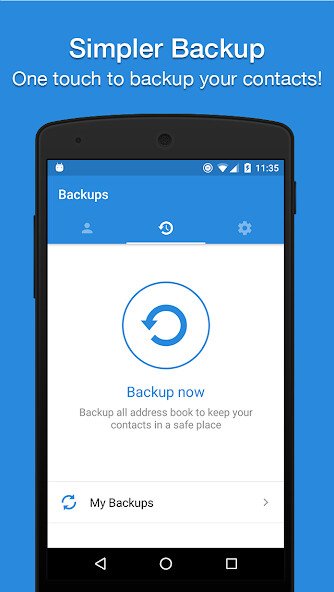
Easy Backup allows you to backup your phones entire contacts list with a single tap, by uploading your contacts to a secured cloud to keep them safe!
Export your contacts - you can easily send a backup .vcf file of your contacts book to any email address!
You can also send contacts via various share services such as: WhatsApp, Gmail, Google Drive, SMS, Dropbox, Skype, Telegram and many others!
Easy Backup is the easiest and the most efficient way to transfer and recover contact details of your friends and family if you lose your smartphone or switch to a new one!
How it works:
To Backup your contacts:
1.Download Easy Backup on your phone
2.Create an account with your email address, Facebook or Google details.
3.Allow Easy Backup to access your contacts.
4.Hit the big Backup Now button
5.Thats it! Your contacts are safe on our cloud
To Transfer your contacts:
1.Download Easy Backup on your other device
2.In case you are switching to an iPhone just use Easy Backups iOS app
3.Sign in with the same account you did the first time
4.Hit My Backups on the bottom part of your screen
5.Now you have access to all your cloud backups of your address book contacts!
To Restore your contacts:
1.In My backups tap the backup file you would like to restore contacts from
2.Hit Tap to download
3.Hit Preview and select all or any contacts you want to restore
4.Hit Restore Contacts
5.Thats it! Your contacts have been recovered!
To Import/Export your contacts:
1.Go to My Backups
2.Choose the local or cloud backup you want to export
3.Select all or any contacts from the list
4.Hit Email to send a .vcf file by email or Export to choose from the many services you can upload your backups to
5.Open the .vcf file you just sent yourself on the other device and update your contacts
6.Easy isnt it?
MAIN FEATURES
One tap to backup your contacts!
Transfer your contacts address book between mobile devices with ease!
Offline Backup.
No need to sync to any server.
Just email yourself the backup file.
Simple Restore - just tap on the .vcf file in any Android or iPhone mail client.
Save a copy of the backup file in your Computer.
Backup Contacts as VCF (VCard).
Quickly export your backups to Dropbox, Google Drive, SD Card
Move contacts between accounts (Google, Exchange, Gmail, Address Book)
Simple Manage - all your backups automatically saved in your SD Card for future use.
Never lose your contacts again
Easy Backup supports any kind of provider: Google, Exchange, Yahoo, Facebook, LinkedIn, Gmail, iCloud, Outlook.
AVAILABLE IN 15 DIFFERENT LANGUAGES:
English, Espaol, Franais, Italiano, Deutsch, Portugus (Br.), (Simplified), (Traditional), , , Nederlands, , Trke, ,
Easy Backup allows you to backup your phones entire contacts list with a single tap, by uploading your contacts to a secured cloud to keep them safe!
Export your contacts - you can easily send a backup .vcf file of your contacts book to any email address!
You can also send contacts via various share services such as: WhatsApp, Gmail, Google Drive, SMS, Dropbox, Skype, Telegram and many others!
Easy Backup is the easiest and the most efficient way to transfer and recover contact details of your friends and family if you lose your smartphone or switch to a new one!
How it works:
To Backup your contacts:
1.Download Easy Backup on your phone
2.Create an account with your email address, Facebook or Google details.
3.Allow Easy Backup to access your contacts.
4.Hit the big Backup Now button
5.Thats it! Your contacts are safe on our cloud
To Transfer your contacts:
1.Download Easy Backup on your other device
2.In case you are switching to an iPhone just use Easy Backups iOS app
3.Sign in with the same account you did the first time
4.Hit My Backups on the bottom part of your screen
5.Now you have access to all your cloud backups of your address book contacts!
To Restore your contacts:
1.In My backups tap the backup file you would like to restore contacts from
2.Hit Tap to download
3.Hit Preview and select all or any contacts you want to restore
4.Hit Restore Contacts
5.Thats it! Your contacts have been recovered!
To Import/Export your contacts:
1.Go to My Backups
2.Choose the local or cloud backup you want to export
3.Select all or any contacts from the list
4.Hit Email to send a .vcf file by email or Export to choose from the many services you can upload your backups to
5.Open the .vcf file you just sent yourself on the other device and update your contacts
6.Easy isnt it?
MAIN FEATURES
One tap to backup your contacts!
Transfer your contacts address book between mobile devices with ease!
Offline Backup.
No need to sync to any server.
Just email yourself the backup file.
Simple Restore - just tap on the .vcf file in any Android or iPhone mail client.
Save a copy of the backup file in your Computer.
Backup Contacts as VCF (VCard).
Quickly export your backups to Dropbox, Google Drive, SD Card
Move contacts between accounts (Google, Exchange, Gmail, Address Book)
Simple Manage - all your backups automatically saved in your SD Card for future use.
Never lose your contacts again
Easy Backup supports any kind of provider: Google, Exchange, Yahoo, Facebook, LinkedIn, Gmail, iCloud, Outlook.
AVAILABLE IN 15 DIFFERENT LANGUAGES:
English, Espaol, Franais, Italiano, Deutsch, Portugus (Br.), (Simplified), (Traditional), , , Nederlands, , Trke, ,
MyAndroid is not a downloader online for Easy Contacts Backup Restore. It only allows to test online Easy Contacts Backup Restore with apkid com.simpler.backup. MyAndroid provides the official Google Play Store to run Easy Contacts Backup Restore online.
