

We provide Profile Scheduler : Schedule and Volume Manager online (apkid: com.shubhobrata.roy.autoaudioprofilechangerandmanager) in order to run this application in our online Android emulator.
Description:
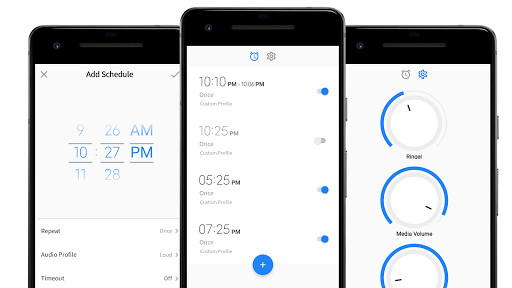
Run this app named Profile Scheduler : Schedule and Volume Manager using MyAndroid.
You can do it using our Android online emulator.
Works from Lollipop Sandwich to Pie
Did you ever wondered , if you could schedule your Ringer Volume preference of your phone , so that you dont have to worry about changing your Audio Profile manually when you are at school/home/work ?
This app lets you to schedule your Audio Profile preference for different times of a day .
This application lets you to :
Dedicated instant volume changer
Change your audio profile to Loud , Silent , Vibrate or Custom Volume Mode automatically on scheduled time
Schedule Audio Profile update to only once , daily , weekday basis
Edit and Cancel applied scheduled
Set timeout of profiles
No battery drain :
Highly optimized application that does not drain your battery unlike other scheduler apps
Simple , Easy and Just works :
Very simple and easy to use application , that makes scheduling almost effortless.
Supports from android P to all the way back to android Jelly Bean
Premium features on free app :
Premium scheduler at zero cost
Tiny Scheduler yet Powerful
Dedicated instant volume controller
Change calling volume without calling someone , change media volume or ringer volume , all from one place
Did you ever wondered , if you could schedule your Ringer Volume preference of your phone , so that you dont have to worry about changing your Audio Profile manually when you are at school/home/work ?
This app lets you to schedule your Audio Profile preference for different times of a day .
This application lets you to :
Dedicated instant volume changer
Change your audio profile to Loud , Silent , Vibrate or Custom Volume Mode automatically on scheduled time
Schedule Audio Profile update to only once , daily , weekday basis
Edit and Cancel applied scheduled
Set timeout of profiles
No battery drain :
Highly optimized application that does not drain your battery unlike other scheduler apps
Simple , Easy and Just works :
Very simple and easy to use application , that makes scheduling almost effortless.
Supports from android P to all the way back to android Jelly Bean
Premium features on free app :
Premium scheduler at zero cost
Tiny Scheduler yet Powerful
Dedicated instant volume controller
Change calling volume without calling someone , change media volume or ringer volume , all from one place
MyAndroid is not a downloader online for Profile Scheduler : Schedule and Volume Manager. It only allows to test online Profile Scheduler : Schedule and Volume Manager with apkid com.shubhobrata.roy.autoaudioprofilechangerandmanager. MyAndroid provides the official Google Play Store to run Profile Scheduler : Schedule and Volume Manager online.
