

We provide Ringtone Editor - MP3 Cutter online (apkid: com.senor.ringeditor2) in order to run this application in our online Android emulator.
Description:
Run this app named Ringtone Editor - MP3 Cutter using MyAndroid.
You can do it using our Android online emulator.
Cut the best part of your audio song and save it as your Ringtone/Alarm/Music File/Notification Tone.
Make your own MP3 ringtones fast and easy with this all in one new app.The cut results are stored in "/mnt/sdcard/media/audio".
You can even record a live audio and this new MP3 editor can edit and trim the best parts from it.
All totally FREE to tone your music!!
Ringtor is a Music Editor/Alarm Tone maker/Ringtone maker/Notification Tone creator.
Supports MP3, WAV, AAC, AMR and most other music formats.
1.Select mp3/music from your mobile or from Recordings.
2.Select area to be chopped from your audio.
3.Save as Ringtone/Music/Alarm/Notification.
Features:
- Record button at top left of app to record an audio/music for editing.
- An Inverted Red Triangle to Select and Edit Mp3/Music from your Mobile/SD.
- Option to delete (with confirmation alert) the created Ringtone/Music/Alarm/Notification Tone.
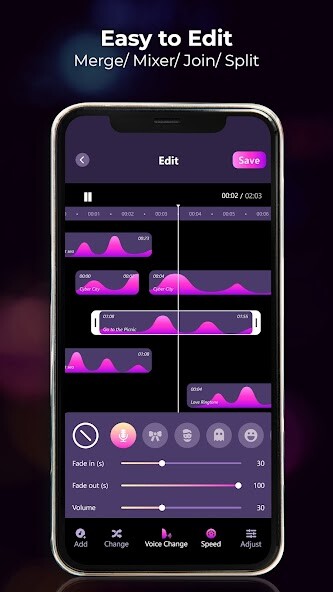
- View a scrollable waveform representation of the audio file at 4 zoom levels.
- Set start & end for the audio clip, using an optional touch interface.
- Tap anywhere on the wave & the built-in Music player starts playing at that position.
- Manually set the Start & End time(in seconds) by typing the values in text boxes at bottom of app.
- Option to Name the new cut clip while saving it as Ringtone/Music/Alarm/Notification Tone.
- Set the new clip as default ringtone or assign ringtone to contacts, using this ringtone editor.
An MP3 Converter & Ringtone Maker app to style old songs a new way, just for your use FREE!
This MP3 Cutter & Ringtone Maker app has inbuilt:
-Own Audio\\Mp3 Player
-Own Audio\\Mp3 Cutter
-Own Audio Recorder
Explanation for the permissions:
android.permission.INTERNET
android.permission.READ_PHONE_STATE
android.premission.ACCESS_NETWORK_STATE
android.permission.READ_CONTACTS
android.permission.WRITE_CONTACTS
After you create the ringtone, there is a choice to assign it to your contact.
If you choose this option, the Ringtone Editor need to read your contact data and show them in the list, then you can assign the new ringtone to somebody.
Ringtone Editor will not collect your contact information.
android.permission.WRITE_SETTINGS
android.permission.WRITE_EXTERNAL_STORAGE
After you save a new Ringtone, the APP need rights to write it to your SD card.
------------------
Disclaimer
This app is based on Ringdroid code, and licensed under the Apache License.
Ringdroid code: http: //code.google.com/p/ringdroid/
Apache License, Version 2.0: http: //www.apache.org/licenses/LICENSE-2.0.html
Make your own MP3 ringtones fast and easy with this all in one new app.The cut results are stored in "/mnt/sdcard/media/audio".
You can even record a live audio and this new MP3 editor can edit and trim the best parts from it.
All totally FREE to tone your music!!
Ringtor is a Music Editor/Alarm Tone maker/Ringtone maker/Notification Tone creator.
Supports MP3, WAV, AAC, AMR and most other music formats.
1.Select mp3/music from your mobile or from Recordings.
2.Select area to be chopped from your audio.
3.Save as Ringtone/Music/Alarm/Notification.
Features:
- Record button at top left of app to record an audio/music for editing.
- An Inverted Red Triangle to Select and Edit Mp3/Music from your Mobile/SD.
- Option to delete (with confirmation alert) the created Ringtone/Music/Alarm/Notification Tone.
- View a scrollable waveform representation of the audio file at 4 zoom levels.
- Set start & end for the audio clip, using an optional touch interface.
- Tap anywhere on the wave & the built-in Music player starts playing at that position.
- Manually set the Start & End time(in seconds) by typing the values in text boxes at bottom of app.
- Option to Name the new cut clip while saving it as Ringtone/Music/Alarm/Notification Tone.
- Set the new clip as default ringtone or assign ringtone to contacts, using this ringtone editor.
An MP3 Converter & Ringtone Maker app to style old songs a new way, just for your use FREE!
This MP3 Cutter & Ringtone Maker app has inbuilt:
-Own Audio\\Mp3 Player
-Own Audio\\Mp3 Cutter
-Own Audio Recorder
Explanation for the permissions:
android.permission.INTERNET
android.permission.READ_PHONE_STATE
android.premission.ACCESS_NETWORK_STATE
android.permission.READ_CONTACTS
android.permission.WRITE_CONTACTS
After you create the ringtone, there is a choice to assign it to your contact.
If you choose this option, the Ringtone Editor need to read your contact data and show them in the list, then you can assign the new ringtone to somebody.
Ringtone Editor will not collect your contact information.
android.permission.WRITE_SETTINGS
android.permission.WRITE_EXTERNAL_STORAGE
After you save a new Ringtone, the APP need rights to write it to your SD card.
------------------
Disclaimer
This app is based on Ringdroid code, and licensed under the Apache License.
Ringdroid code: http: //code.google.com/p/ringdroid/
Apache License, Version 2.0: http: //www.apache.org/licenses/LICENSE-2.0.html
MyAndroid is not a downloader online for Ringtone Editor - MP3 Cutter. It only allows to test online Ringtone Editor - MP3 Cutter with apkid com.senor.ringeditor2. MyAndroid provides the official Google Play Store to run Ringtone Editor - MP3 Cutter online.
