
We provide CommuteWatcher online (apkid: com.sammoin.commutewatcher) in order to run this application in our online Android emulator.
Description:
Run this app named CommuteWatcher using MyAndroid.
You can do it using our Android online emulator.
A lightweight little app to help remind you when it's time to check your commutes.
First, you can set your default starting location in the Settings menu to save yourself time when you're adding a new commute.
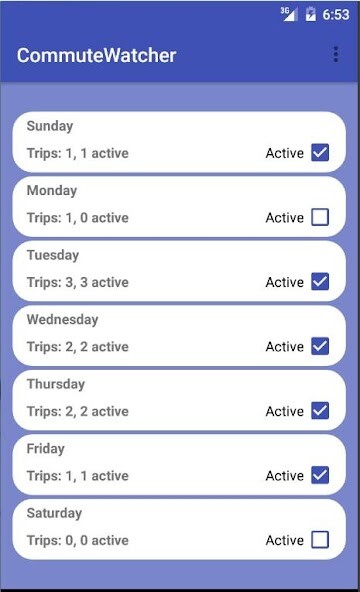
Otherwise you can jump in by tapping a day you'd like to add a commute, then hit the orange button at the bottom right to start.
Enter in the full address of your start and end destinations, then tap on the Set Time To Check Your Commute button to enter a time you'd like CommuteWatcher to remind you to check the commute you set.
When it's time, CommuteWatcher will send you a notification that you can tap on and send the Start and End info to the map app of your choice (works best with Google Maps), and will then run the search for you.
It'll also give you a quick estimate of the shortest time and distance of the commute you entered.
A long-press will let you delete a commute, or you can tap on previously-created commutes to edit them however you like.
You can set individual commutes or days as inactive, or you can turn off the alarm entirely in the settings menu.
A simple widget has also been included that will display your next upcoming commute for the current day.
First, you can set your default starting location in the Settings menu to save yourself time when you're adding a new commute.
Otherwise you can jump in by tapping a day you'd like to add a commute, then hit the orange button at the bottom right to start.
Enter in the full address of your start and end destinations, then tap on the Set Time To Check Your Commute button to enter a time you'd like CommuteWatcher to remind you to check the commute you set.
When it's time, CommuteWatcher will send you a notification that you can tap on and send the Start and End info to the map app of your choice (works best with Google Maps), and will then run the search for you.
It'll also give you a quick estimate of the shortest time and distance of the commute you entered.
A long-press will let you delete a commute, or you can tap on previously-created commutes to edit them however you like.
You can set individual commutes or days as inactive, or you can turn off the alarm entirely in the settings menu.
A simple widget has also been included that will display your next upcoming commute for the current day.
MyAndroid is not a downloader online for CommuteWatcher. It only allows to test online CommuteWatcher with apkid com.sammoin.commutewatcher. MyAndroid provides the official Google Play Store to run CommuteWatcher online.
