

We provide RV Hearing Aid online (apkid: com.rvhearingaid.androidrv) in order to run this application in our online Android emulator.
Description:
Run this app named RV Hearing Aid using MyAndroid.
You can do it using our Android online emulator.
RV Hearing Aid works like a hearing aid and assists users to listen clearly to the environmental voices without losing the important details.
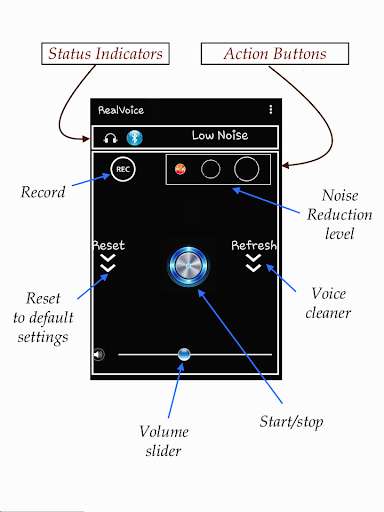
It makes use of your smartphone microphone to pick up environmental sound, and then processes the audio data before sending to audio output devices such as wired earphone, headphone or Bluetooth headset.
The Noise Reduction feature efficiently removes most of the noisy nuances picked up by the microphone, leaving behind clear voices with S/N ratio that is up to 30dB higher.
(Do note that some phone models may not perform well using this feature, as it requires higher CPU processing power.) Alternatively, users can choose to turn off the Noise Reduction feature while in a quieter environment, simply by choosing the Low Noise option.
Users whose hearing needs are frequency specific may use the graphic audio equalizer feature to meet their need.
At times where the audio input signals are weak, users may use the microphone pre-amp to increase audio output.
RV Hearing Aid also comes with a recording feature that allow users to record their conversations.
They can go to Records to play or delete their recordings.
To achieve better sound quality, users may choose higher sampling rate under Settings.
In some phone models, voice delay improves (reduces) with higher sampling rate.
Some phone models may not perform well with higher sampling rates, as it requires higher CPU processing power.
NOTE:
1)\tTake care when increasing volume.
High volumes may adversely affect the ears.
2)\tRV Hearing Aid does not work on every device equally well.
Certain models may not run Med Noise and High Noise features well.
This is because these options contain Noise Reduction feature and thus require higher CPU processing power.
The same goes for higher sampling rates, as more CPU processing power is also required.
3)\tWhen the output sound is corrupted, press Stop followed by Start button.
If it does not improve, use the following options: a) change to low noise; b) change Sampling Rate to 8000; c) change Mic-preamp to low, d) adjust slider volume to center, e) adjust Equalizer volume to Flat.
4)\tIf you hear echo, reduce slider volume.
Contact us by Email: [email protected]
It makes use of your smartphone microphone to pick up environmental sound, and then processes the audio data before sending to audio output devices such as wired earphone, headphone or Bluetooth headset.
The Noise Reduction feature efficiently removes most of the noisy nuances picked up by the microphone, leaving behind clear voices with S/N ratio that is up to 30dB higher.
(Do note that some phone models may not perform well using this feature, as it requires higher CPU processing power.) Alternatively, users can choose to turn off the Noise Reduction feature while in a quieter environment, simply by choosing the Low Noise option.
Users whose hearing needs are frequency specific may use the graphic audio equalizer feature to meet their need.
At times where the audio input signals are weak, users may use the microphone pre-amp to increase audio output.
RV Hearing Aid also comes with a recording feature that allow users to record their conversations.
They can go to Records to play or delete their recordings.
To achieve better sound quality, users may choose higher sampling rate under Settings.
In some phone models, voice delay improves (reduces) with higher sampling rate.
Some phone models may not perform well with higher sampling rates, as it requires higher CPU processing power.
NOTE:
1)\tTake care when increasing volume.
High volumes may adversely affect the ears.
2)\tRV Hearing Aid does not work on every device equally well.
Certain models may not run Med Noise and High Noise features well.
This is because these options contain Noise Reduction feature and thus require higher CPU processing power.
The same goes for higher sampling rates, as more CPU processing power is also required.
3)\tWhen the output sound is corrupted, press Stop followed by Start button.
If it does not improve, use the following options: a) change to low noise; b) change Sampling Rate to 8000; c) change Mic-preamp to low, d) adjust slider volume to center, e) adjust Equalizer volume to Flat.
4)\tIf you hear echo, reduce slider volume.
Contact us by Email: [email protected]
MyAndroid is not a downloader online for RV Hearing Aid. It only allows to test online RV Hearing Aid with apkid com.rvhearingaid.androidrv. MyAndroid provides the official Google Play Store to run RV Hearing Aid online.
