

We provide ADAMA Darwin online (apkid: com.proagrica.adama) in order to run this application in our online Android emulator.
Description:
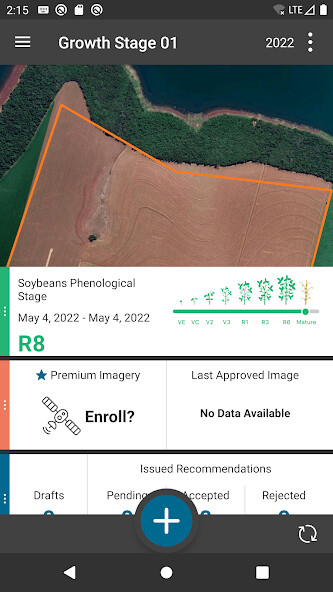
Run this app named ADAMA Darwin using MyAndroid.
You can do it using our Android online emulator.
ADAMA Darwin is now available on Android! ADAMA Darwin Android is here to serve your field data gathering needs.
In this version of ADAMA Darwin Android, your Yield data will automatically sync to your app.
You can view your Yield layers easily by navigating to your Yield events.
You can also create a field boundary using the drawing tools, GPS, or by selecting a previously-digitized field boundary.
As well, you can create Scouting activities where youll have the option to add multiple photos to show the overall health of your crops.
After collecting your Scouting data, you can create Scouting PDF reports that will include all the information and photos you gathered in your activities.
And just like with your other ADAMA Darwin apps, youll also be able to edit your Scouting activities, share them with coworkers, and view activities that have been shared with you via your agX Connections.
More about this release
Growers, Farms, and Fields
When you log into ADAMA Darwin for the first time, youll be able to download any Growers, Farms, and Fields you may have previously created in other ADAMA Darwin apps or agX-compliant applications.
You can now swipe on your Grower, Farm or Field in the GFF Pane to access the Rename, Delete, and Edit Boundary options.
Boundary Creation
You can create field Boundaries using one or a combination of the four tools: Pick a Field, Draw, Pivot, or GPS
Once the field Boundary is drawn, but not saved, you can make edits using the Edit tools: Edit Vertex, Draw Split, or GPS Split
Scouting
You have the option of collecting a Scouting activity based on points in a field, or by using polygon data.
You can enter information about your activity such as Crop Information, Weeds, Insects, Diseases, etc.
Yield
Yield data now automatically syncs to ADAMA Darwin.
Users that have yield data in their agX account will now be able to sync and view their data.
Users can navigate to their yield events and make a season selection to view their yield layer.
Reports
Users can now create Scouting PDF Reports, which include all information and photos that were gathered during the collection.
Scouting Event Splits
Scouting Splits are now available to use when collecting an event.
Users can now Draw a split using the Split feature or they can collect using GPS, both Manually and Automatically.
V2 agX Content and Settings
The app will detect your region and language from the device settings.
V2 content will replace the existing V1 content that is in ADAMA Darwin.
Content will now be refreshed daily upon opening the app.
Users can also adjust their Content setting with the new Languages and Regions feature.
Open Settings in ADAMA Darwin and look under the General tab to find Languages and Regions.
User Defined Jobs
Jobs Workflow: While viewing a Crop Protection, Fertilizer , Planting or Tillage, users can now progress the Job to the next stage in their workflow using the 'Take Action' button.
Planting and Tillage Collection and Editing
Prior to collecting a Planting, or Tillage from the plus button, users will be prompted to select an Activity Type: 'Do you want to create a Planned Activity, a Recommendation, a Work Order, or a Work Record.' The user is also able to edit when viewing.
GDPR Privacy Policy: https: //risk.lexisnexis.com/group/privacy-policy
CCPA Privacy Policy: https: //risk.lexisnexis.com/ccpa-privacy-notice
In this version of ADAMA Darwin Android, your Yield data will automatically sync to your app.
You can view your Yield layers easily by navigating to your Yield events.
You can also create a field boundary using the drawing tools, GPS, or by selecting a previously-digitized field boundary.
As well, you can create Scouting activities where youll have the option to add multiple photos to show the overall health of your crops.
After collecting your Scouting data, you can create Scouting PDF reports that will include all the information and photos you gathered in your activities.
And just like with your other ADAMA Darwin apps, youll also be able to edit your Scouting activities, share them with coworkers, and view activities that have been shared with you via your agX Connections.
More about this release
Growers, Farms, and Fields
When you log into ADAMA Darwin for the first time, youll be able to download any Growers, Farms, and Fields you may have previously created in other ADAMA Darwin apps or agX-compliant applications.
You can now swipe on your Grower, Farm or Field in the GFF Pane to access the Rename, Delete, and Edit Boundary options.
Boundary Creation
You can create field Boundaries using one or a combination of the four tools: Pick a Field, Draw, Pivot, or GPS
Once the field Boundary is drawn, but not saved, you can make edits using the Edit tools: Edit Vertex, Draw Split, or GPS Split
Scouting
You have the option of collecting a Scouting activity based on points in a field, or by using polygon data.
You can enter information about your activity such as Crop Information, Weeds, Insects, Diseases, etc.
Yield
Yield data now automatically syncs to ADAMA Darwin.
Users that have yield data in their agX account will now be able to sync and view their data.
Users can navigate to their yield events and make a season selection to view their yield layer.
Reports
Users can now create Scouting PDF Reports, which include all information and photos that were gathered during the collection.
Scouting Event Splits
Scouting Splits are now available to use when collecting an event.
Users can now Draw a split using the Split feature or they can collect using GPS, both Manually and Automatically.
V2 agX Content and Settings
The app will detect your region and language from the device settings.
V2 content will replace the existing V1 content that is in ADAMA Darwin.
Content will now be refreshed daily upon opening the app.
Users can also adjust their Content setting with the new Languages and Regions feature.
Open Settings in ADAMA Darwin and look under the General tab to find Languages and Regions.
User Defined Jobs
Jobs Workflow: While viewing a Crop Protection, Fertilizer , Planting or Tillage, users can now progress the Job to the next stage in their workflow using the 'Take Action' button.
Planting and Tillage Collection and Editing
Prior to collecting a Planting, or Tillage from the plus button, users will be prompted to select an Activity Type: 'Do you want to create a Planned Activity, a Recommendation, a Work Order, or a Work Record.' The user is also able to edit when viewing.
GDPR Privacy Policy: https: //risk.lexisnexis.com/group/privacy-policy
CCPA Privacy Policy: https: //risk.lexisnexis.com/ccpa-privacy-notice
MyAndroid is not a downloader online for ADAMA Darwin. It only allows to test online ADAMA Darwin with apkid com.proagrica.adama. MyAndroid provides the official Google Play Store to run ADAMA Darwin online.
