
We provide Grocery King: Grocery List online (apkid: com.pocketlabs.groceryking2) in order to run this application in our online Android emulator.
Description:
Run this app named Grocery King: Grocery List using MyAndroid.
You can do it using our Android online emulator.
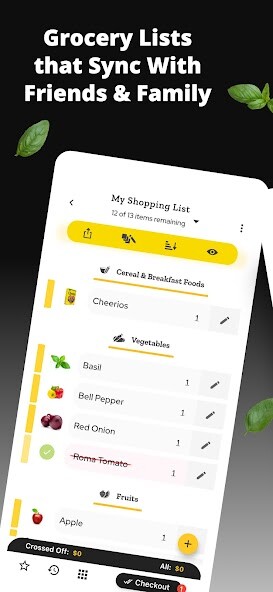
Grocery King is an app that helps you and your family to easily create Grocery shopping lists and instantly share them with each other for a truly coordinated shopping experience. Grocery King also includes a very sophisticated Pantry List Manager, Recipe Organizer and Meal Planner with the ability to import recipes from hundreds of popular recipe websites.
Grocery King app is available for all your devices - Windows, Mac, iPad, Android Tablets, Android phones & Apple iPhone.
===========
FEATURES
===========
LISTS
2000+ everyday grocery items neatly categorized & ready for you to use with built-in photos, just tap to add items to your lists
Search & Lookup grocery items using tags, categories, and types.
Easily create new shopping lists and add your favorites from the catalog.
Your past grocery shopping items are fully saved making it easy to add those items back to your new list week after week.
Check off items from your lists and when you are ready to checkout, see exactly how much it will cost you for the purchase.
Attach and save your grocery receipts after every checkout for easy returns in the future.
(US Only) Use our brand new Shopping assistant feature to shop at more than 30 Major US retailers.
Convert your existing lists to real cart items that you can either have delivered or pick them up from curbside.
Smart list sorting automatically sorts your list items based on the same order in which you regularly shop at a retailer.
The more you use the app the better the app gets at sorting the list.
Attach item photos from your camera or search the web to look up billions of common items that match the name.
Scan item barcode to add/remove items from your list.
Advanced list customization and catalog grouping to create fully custom lists.
Set list item notes, taxes, prices, coupons, and item priorities.
Sort your list items based on the order of the Aisles at your store.
Send your shopping list as an e-mail or Text(SMS) message
PANTRY
Full featured Pantry / Inventory functionality.
When items are checked out from a shopping list, they automatically go into the inventory.
When you mark a meal plan as completed, the recipe ingredient quantity is automatically deducted
Expiry data for hundreds of everyday items already included and with one tap you can enable expiry alerts so that you can be reminded of items that will expire soon
Help / Tutorial for every functionality now included within the app
New setting to display list in a compact form factor
Checked off items in a shopping list now automatically move down to a 'Completed' section
Tons of bug fixes and UI enhancements
RECIPES & MEAL PLANS
Import & download millions of recipes from the most popular recipe websites around.
When your recipe is imported, you get access to all the ingredients, directions, and photos all neatly organized and grouped
When you are ready to prepare a meal from a recipe, you can quickly add recipe ingredients to a shopping list that you created earlier.
Add your own recipes through an intuitive interface with photos, ingredients, and directions.
Search for recipes by name, ingredient or category.
Add a recipe to a weekly Meal Plan with one tap.
All recipes and meal plans are accessible offline.
SHARING, SYNCING & APPLICATION BACKUP
With Grocery King premium you can instantly sync and share your lists, Recipes and Meal Plans with your family.
Any changes you make on one device is instantly available on any other device that is part of Grocery King online account.
All your lists, recipes and meal plans are securely backed up in the cloud as part of Grocery King account.
When you get a new device, just sign-in with the Grocery King account to retrieve your data.
CONTACT US
[email protected]
Grocery King app is available for all your devices - Windows, Mac, iPad, Android Tablets, Android phones & Apple iPhone.
===========
FEATURES
===========
LISTS
2000+ everyday grocery items neatly categorized & ready for you to use with built-in photos, just tap to add items to your lists
Search & Lookup grocery items using tags, categories, and types.
Easily create new shopping lists and add your favorites from the catalog.
Your past grocery shopping items are fully saved making it easy to add those items back to your new list week after week.
Check off items from your lists and when you are ready to checkout, see exactly how much it will cost you for the purchase.
Attach and save your grocery receipts after every checkout for easy returns in the future.
(US Only) Use our brand new Shopping assistant feature to shop at more than 30 Major US retailers.
Convert your existing lists to real cart items that you can either have delivered or pick them up from curbside.
Smart list sorting automatically sorts your list items based on the same order in which you regularly shop at a retailer.
The more you use the app the better the app gets at sorting the list.
Attach item photos from your camera or search the web to look up billions of common items that match the name.
Scan item barcode to add/remove items from your list.
Advanced list customization and catalog grouping to create fully custom lists.
Set list item notes, taxes, prices, coupons, and item priorities.
Sort your list items based on the order of the Aisles at your store.
Send your shopping list as an e-mail or Text(SMS) message
PANTRY
Full featured Pantry / Inventory functionality.
When items are checked out from a shopping list, they automatically go into the inventory.
When you mark a meal plan as completed, the recipe ingredient quantity is automatically deducted
Expiry data for hundreds of everyday items already included and with one tap you can enable expiry alerts so that you can be reminded of items that will expire soon
Help / Tutorial for every functionality now included within the app
New setting to display list in a compact form factor
Checked off items in a shopping list now automatically move down to a 'Completed' section
Tons of bug fixes and UI enhancements
RECIPES & MEAL PLANS
Import & download millions of recipes from the most popular recipe websites around.
When your recipe is imported, you get access to all the ingredients, directions, and photos all neatly organized and grouped
When you are ready to prepare a meal from a recipe, you can quickly add recipe ingredients to a shopping list that you created earlier.
Add your own recipes through an intuitive interface with photos, ingredients, and directions.
Search for recipes by name, ingredient or category.
Add a recipe to a weekly Meal Plan with one tap.
All recipes and meal plans are accessible offline.
SHARING, SYNCING & APPLICATION BACKUP
With Grocery King premium you can instantly sync and share your lists, Recipes and Meal Plans with your family.
Any changes you make on one device is instantly available on any other device that is part of Grocery King online account.
All your lists, recipes and meal plans are securely backed up in the cloud as part of Grocery King account.
When you get a new device, just sign-in with the Grocery King account to retrieve your data.
CONTACT US
[email protected]
MyAndroid is not a downloader online for Grocery King: Grocery List. It only allows to test online Grocery King: Grocery List with apkid com.pocketlabs.groceryking2. MyAndroid provides the official Google Play Store to run Grocery King: Grocery List online.
