

We provide Quantenkey Access Manager online (apkid: com.picosens.qkey.access) in order to run this application in our online Android emulator.
Description:
Run this app named Quantenkey Access Manager using MyAndroid.
You can do it using our Android online emulator.
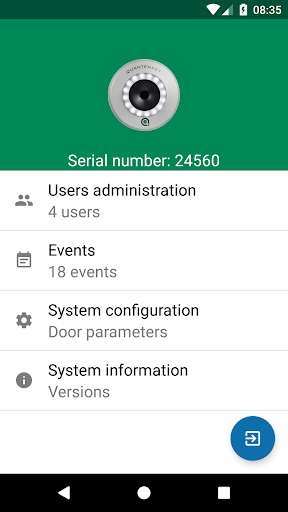
User management and access authorizations are made simple and intuitive by using the Quantenkey Access Manager Android device App and the Quantenreader.
Use your Adminkey to unlock the system and gain access to many management features using your SCK (Secured Communication Key).
The App makes it quick and easy to delete a lost Quantenkey, authorize a new one, see who opened the door, etc, and all this, without any radio communication!
The Quantenkey: the perfect link between the analog and the digital world a combination of a mechanical key and an electronic lock.
Functions:
-\tUser management (name, rights, date)
-\tQuick add a new key using the QR-Codes on the cards delivered with the Quantenkey
-\tQuick and easy deletion of users in case of a lost or stolen key
-\tEvents overview: complete user identification, access details, user addition, deletion, manipulation and sabotage attempts
-\tConfiguration of the door or electronic lock parameters
Requirements:
-\tThe Quantenkey system (quantenkey.de)
-\tThe SCK to connect to your Android Smartphone or Tablet
-\tA Quantenkey with administrator rights (Adminkey) for your Quantenreader
Use your Adminkey to unlock the system and gain access to many management features using your SCK (Secured Communication Key).
The App makes it quick and easy to delete a lost Quantenkey, authorize a new one, see who opened the door, etc, and all this, without any radio communication!
The Quantenkey: the perfect link between the analog and the digital world a combination of a mechanical key and an electronic lock.
Functions:
-\tUser management (name, rights, date)
-\tQuick add a new key using the QR-Codes on the cards delivered with the Quantenkey
-\tQuick and easy deletion of users in case of a lost or stolen key
-\tEvents overview: complete user identification, access details, user addition, deletion, manipulation and sabotage attempts
-\tConfiguration of the door or electronic lock parameters
Requirements:
-\tThe Quantenkey system (quantenkey.de)
-\tThe SCK to connect to your Android Smartphone or Tablet
-\tA Quantenkey with administrator rights (Adminkey) for your Quantenreader
MyAndroid is not a downloader online for Quantenkey Access Manager. It only allows to test online Quantenkey Access Manager with apkid com.picosens.qkey.access. MyAndroid provides the official Google Play Store to run Quantenkey Access Manager online.
