

We provide ScanD - Document Scanner online (apkid: com.ntp.scand) in order to run this application in our online Android emulator.
Description:
Run this app named ScanD - Document Scanner using MyAndroid.
You can do it using our Android online emulator.
You can use this app for scanning photos, documents, QR/BR code.
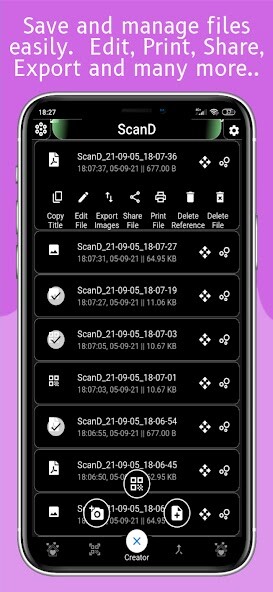
You can interact with the scanned photos like compressing, editing and filtering.
Why to Use?
--> Photo Scan(jpeg), Document Scan(pdf) & QR/BR Scan available.
--> QR Code generation.
--> Use of high quality device camera for scanning documents.
--> Advanced recursive image compression tool.
--> Advanced photo editing tool.
--> Smart cache management, it will clear it's unnecessary caches automatically.
--> 60+ Unique filter.
--> Add details to document like creator, author, subject, keywords etc.
--> Export image to pdf or pdf to images.
--> Print, share, open or edit files from the app.
--> Fast & Easy Interface.
--> 16+ Unique themes.
--> Unlimited page support (In trial) : : May vary the limit with device capability : : In case of crash check if enough memory is available (Our backup and restore system will help you to recover the unsaved document but be sure you are not clearing cache data in between).
Feature Request: We will bring a form soon within the application, for now put a good rating if you like the app and write a detailed request in review.
Requirement: A stable internet connection.
Permissions:
--> Storage: For saving, deleting or accessing files
--> Camera: For scanning document or photos
--> Microphone: Optional
You can interact with the scanned photos like compressing, editing and filtering.
Why to Use?
--> Photo Scan(jpeg), Document Scan(pdf) & QR/BR Scan available.
--> QR Code generation.
--> Use of high quality device camera for scanning documents.
--> Advanced recursive image compression tool.
--> Advanced photo editing tool.
--> Smart cache management, it will clear it's unnecessary caches automatically.
--> 60+ Unique filter.
--> Add details to document like creator, author, subject, keywords etc.
--> Export image to pdf or pdf to images.
--> Print, share, open or edit files from the app.
--> Fast & Easy Interface.
--> 16+ Unique themes.
--> Unlimited page support (In trial) : : May vary the limit with device capability : : In case of crash check if enough memory is available (Our backup and restore system will help you to recover the unsaved document but be sure you are not clearing cache data in between).
Feature Request: We will bring a form soon within the application, for now put a good rating if you like the app and write a detailed request in review.
Requirement: A stable internet connection.
Permissions:
--> Storage: For saving, deleting or accessing files
--> Camera: For scanning document or photos
--> Microphone: Optional
MyAndroid is not a downloader online for ScanD - Document Scanner. It only allows to test online ScanD - Document Scanner with apkid com.ntp.scand. MyAndroid provides the official Google Play Store to run ScanD - Document Scanner online.
