
We provide Jukevox Virtual DJ online (apkid: com.nexwerx.jukevox) in order to run this application in our online Android emulator.
Description:
Run this app named Jukevox Virtual DJ using MyAndroid.
You can do it using our Android online emulator.
Jukevox Media Player from Nexwerx Systems brings a little flare to that dull playlist, and it brings a little nostalgia back to the smartphone.
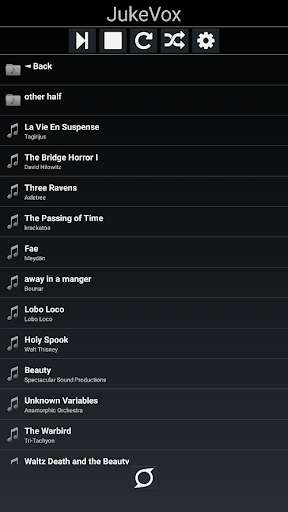
Jukevox loads music from your specified location as a playlist.
Jukevox will read the media and attempt to determine the title and artist of the audio.
Jukevox then uses this information to let our Virtual DJ announce your current and upcoming song.
This app is not a streaming service, and requires MP3 files on your device to operate.
Use the Music Location option in settings to point to the music files on your device.
Let Jukevox liven up your music by adding a true radio station experience to your entertainment.
Jukevox is perfect for those impromptu parties, and family get-togethers.
Just connect up your favorite Bluetooth speakers, or even your car stereo system, and let Jukevox do the rest.
Jukevox gives you all the features you might expect, like continuous playback, and shuffled lists, all while serving up your music, in your way.
Turn on great visuals to accompany your tunes, and the entertainment never ends.
With Jukevox you have the lights, the MC, and the band, all in the palm of your hand.
INSTRUCTIONS:
When you first install the app will look in your SDCARD Music folder.
If this isn't where your music is located, go to settings, and navigate to your music folder.
Other locations on your device would typically be located in the storage folder.
Once you have a list of music to choose from, tap on your song, and your music should begin.
The DJ uses the system volume to communicate.
This volume is independent of the music volume and needs to be turned up in order to hear song announcements.
***********************************************
* CHANGE LOG
***********************************************
Version 2.0
- Doubled the number of songs before a commercial.
- Last song is not announced when user presses next.
- The announcer will now stop talking when you press stop.
- Shuffle and Loop settings are now saved and loaded.
- Background and text colors are now customizable.
These settings are saved and loaded with each use.
- Returning to the Home screen now opens the speaker icon.
The icon can be moved, Long Touch to reopen Jukevox.
- Added ID3 Tag Editor: users can now edit the information that will be used to announce the media.
\tThis adds 128 bytes to the MP3 file containing the information supplied about the media.
\tUsers will be able to edit the Title, Artist, Album, and Year of the file which will be reflected
\tacross the device.
\t
\tUser will use a long press on any song in the list to bring up the editor.
The folder must be reloaded
\tfor the changes to appear in the playlist.
Due to the size of some folders, this it done manually.
Version 1.03
-Updated the response to no internet connection.
The app now recovers from this condition better.
Version 1.02;
-Initial version for product testing and deployment.
\t
Version 1.0
- Production App completed.
Deployed to the Google Play.
Jukevox loads music from your specified location as a playlist.
Jukevox will read the media and attempt to determine the title and artist of the audio.
Jukevox then uses this information to let our Virtual DJ announce your current and upcoming song.
This app is not a streaming service, and requires MP3 files on your device to operate.
Use the Music Location option in settings to point to the music files on your device.
Let Jukevox liven up your music by adding a true radio station experience to your entertainment.
Jukevox is perfect for those impromptu parties, and family get-togethers.
Just connect up your favorite Bluetooth speakers, or even your car stereo system, and let Jukevox do the rest.
Jukevox gives you all the features you might expect, like continuous playback, and shuffled lists, all while serving up your music, in your way.
Turn on great visuals to accompany your tunes, and the entertainment never ends.
With Jukevox you have the lights, the MC, and the band, all in the palm of your hand.
INSTRUCTIONS:
When you first install the app will look in your SDCARD Music folder.
If this isn't where your music is located, go to settings, and navigate to your music folder.
Other locations on your device would typically be located in the storage folder.
Once you have a list of music to choose from, tap on your song, and your music should begin.
The DJ uses the system volume to communicate.
This volume is independent of the music volume and needs to be turned up in order to hear song announcements.
***********************************************
* CHANGE LOG
***********************************************
Version 2.0
- Doubled the number of songs before a commercial.
- Last song is not announced when user presses next.
- The announcer will now stop talking when you press stop.
- Shuffle and Loop settings are now saved and loaded.
- Background and text colors are now customizable.
These settings are saved and loaded with each use.
- Returning to the Home screen now opens the speaker icon.
The icon can be moved, Long Touch to reopen Jukevox.
- Added ID3 Tag Editor: users can now edit the information that will be used to announce the media.
\tThis adds 128 bytes to the MP3 file containing the information supplied about the media.
\tUsers will be able to edit the Title, Artist, Album, and Year of the file which will be reflected
\tacross the device.
\t
\tUser will use a long press on any song in the list to bring up the editor.
The folder must be reloaded
\tfor the changes to appear in the playlist.
Due to the size of some folders, this it done manually.
Version 1.03
-Updated the response to no internet connection.
The app now recovers from this condition better.
Version 1.02;
-Initial version for product testing and deployment.
\t
Version 1.0
- Production App completed.
Deployed to the Google Play.
MyAndroid is not a downloader online for Jukevox Virtual DJ. It only allows to test online Jukevox Virtual DJ with apkid com.nexwerx.jukevox. MyAndroid provides the official Google Play Store to run Jukevox Virtual DJ online.
