
We provide Click to Chat: WAPP online (apkid: com.mukul.whatsappopener) in order to run this application in our online Android emulator.
Description:
Run this app named Click to Chat: WAPP using MyAndroid.
You can do it using our Android online emulator.
Are you annoyed with not being able to send WhatsApp messages without saving contact?
We have got you covered.
Now you can quickly send messages to any phone number which are(not) on your contact list.
Use the Chat Opener App, enter the number, and message(optional) and click on Open Whatsapp, it will redirect to WhatsApp chat of the unsaved phone number with that message(if entered).
This is a convenient app for those who do not want to save a phone number to contacts before they send a WhatsApp message.
Also, you can use it without copying the contact number and pasting or typing it into the app.
Here is how to use it.
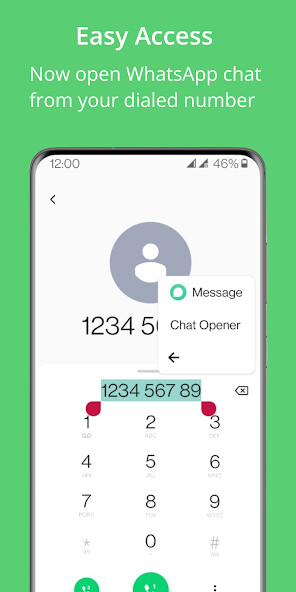
Long press the number from the dial-pad/website/search box/anywhere where it is possible to hold and get options on text (refer to screenshots), select on three dots (or more) and click on Chat Opener.
The app will redirect you to WhatsApp chat.
Isnt it hassle-free?
WhatsApp will notify you if the new phone number does not exist on the WhatsApp or if WhatsApp is not installed on your device.
We know it feels like a daunting task to add a temporary number to send WhatsApp messages to a cab driver, a handyman, a delivery boy, a stranger, or anyone temporarily and we had to save the new phone number in the contact list just because you needed to send a WhatsApp message to them once.
Isnt it odd when these temporarily saved contacts start viewing your WhatsApp statuses?
Features:
-> No ads
-> Open WhatsApp for the number by clicking on Chat Opener by long press
-> Uses No permissions
-> See History of chat opened from chat opener
-> From History, you can open the previous chat, add to contacts, or delete
-> Send message from the app
-> Dark Theme
-> Still not sure about the app? Click on "Try now" to experience instant app
Disclaimer: This app is not affiliated with nor endorsed by WhatsApp Inc.
Also the option Chat Opener that comes on long pressing the number completely depends on the manufacturer of the device.
We have got you covered.
Now you can quickly send messages to any phone number which are(not) on your contact list.
Use the Chat Opener App, enter the number, and message(optional) and click on Open Whatsapp, it will redirect to WhatsApp chat of the unsaved phone number with that message(if entered).
This is a convenient app for those who do not want to save a phone number to contacts before they send a WhatsApp message.
Also, you can use it without copying the contact number and pasting or typing it into the app.
Here is how to use it.
Long press the number from the dial-pad/website/search box/anywhere where it is possible to hold and get options on text (refer to screenshots), select on three dots (or more) and click on Chat Opener.
The app will redirect you to WhatsApp chat.
Isnt it hassle-free?
WhatsApp will notify you if the new phone number does not exist on the WhatsApp or if WhatsApp is not installed on your device.
We know it feels like a daunting task to add a temporary number to send WhatsApp messages to a cab driver, a handyman, a delivery boy, a stranger, or anyone temporarily and we had to save the new phone number in the contact list just because you needed to send a WhatsApp message to them once.
Isnt it odd when these temporarily saved contacts start viewing your WhatsApp statuses?
Features:
-> No ads
-> Open WhatsApp for the number by clicking on Chat Opener by long press
-> Uses No permissions
-> See History of chat opened from chat opener
-> From History, you can open the previous chat, add to contacts, or delete
-> Send message from the app
-> Dark Theme
-> Still not sure about the app? Click on "Try now" to experience instant app
Disclaimer: This app is not affiliated with nor endorsed by WhatsApp Inc.
Also the option Chat Opener that comes on long pressing the number completely depends on the manufacturer of the device.
MyAndroid is not a downloader online for Click to Chat: WAPP. It only allows to test online Click to Chat: WAPP with apkid com.mukul.whatsappopener. MyAndroid provides the official Google Play Store to run Click to Chat: WAPP online.
